Excel What's New: Practical Guide to 2026 Updates
Explore the latest Excel what's new features for 2026, including dynamic arrays, LET/LAMBDA, enhanced data connectivity, and collaboration tools. Practical tips to apply updates in real workflows.


Excel what's new typically centers on expanded formula capabilities, better data handling, and richer collaboration across platforms. The latest updates emphasize dynamic array improvements, broader LET/LAMBDA support, enhanced XLOOKUP and FILTER functions, and stronger Power Query data connectivity. For business users, this translates to faster analysis, simpler data modeling, and more reliable cross‑platform work. According to XLS Library, these changes continue to shape everyday workflows for both aspiring and professional Excel users.
What excel what's new means for everyday users
According to XLS Library, the phrase "excel what's new" captures a moving target: new formulas, better data handling, and improved collaboration across Windows, Mac, and the web. For everyday users, these changes translate into shorter model-building cycles, fewer manual steps, and less context switching between apps. In practice, you’ll see enhancements in how you build dynamic reports, how you reference data across sheets, and how you validate inputs. The goal is not to replace your existing workflows, but to augment them with more reliable, readable formulas and streamlined data flows. In this guide, we’ll unpack the practical implications, with actionable steps you can apply in real projects.
Key themes in Excel what's new for 2026
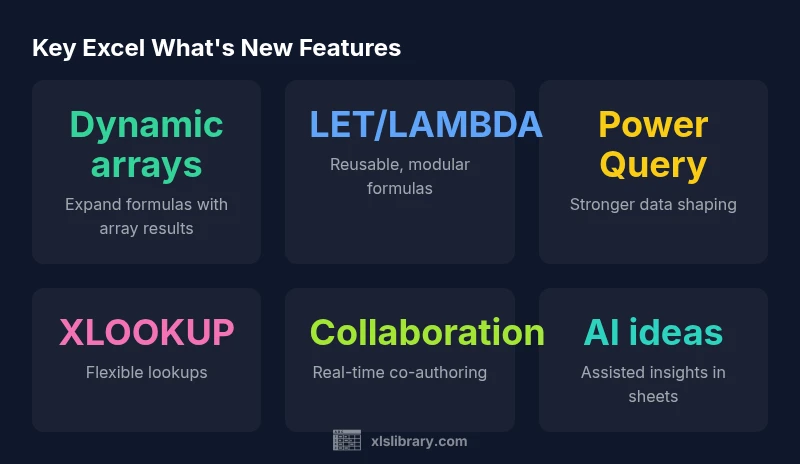
Across platforms, Excel updates tend to cluster around four themes: faster, more reliable formulas; stronger data connectivity; enhanced collaboration; and smarter, AI-assisted insights. Practitioners notice that dynamic array functions continue to mature, LET and LAMBDA enable cleaner and more maintainable formulas, and XLOOKUP remains a flexible workhorse for lookups. Data connections through Power Query become easier to refresh and shape, reducing manual preprocessing. Finally, collaboration improvements let teams co-edit workbooks with fewer conflicts and clearer change tracking.
Dynamic arrays, LET, and LAMBDA: a deeper look
Dynamic arrays fundamentally change how formulas spill results across adjacent cells. In 2026 updates, users gain expanded support for array-enabled functions, including richer syntax and more robust error handling. LET allows you to declare variables inside a formula, improving readability and performance, while LAMBDA opens the door to user-defined functions without leaving Excel. Together, these tools shift complex modeling from brittle, multi-cell formulas to modular, reusable blocks that are easier to test and audit. For practitioners, start by refactoring a few recurring calculations into LET/LAMBDA blocks to see the clarity gains.
Data connectivity and Power Query improvements
Power Query remains the backbone of reliable data shaping in Excel. The latest updates emphasize easier data import from diverse sources, more intuitive data cleaning steps, and more resilient refresh behavior. If you’re integrating external datasets, you’ll notice better connectors, fewer schema errors, and more granular control over data types during the load process. For analysts, the ROI comes from faster onboarding of new data feeds and streamlined refresh schedules, with less manual scripting needed.
Collaboration and cross‑platform workflows
Teams working across Windows, Mac, and the online app increasingly expect real-time co-authoring with minimal conflicts. The newest updates improve version history visibility, conflict resolution prompts, and notification settings for shared workbooks. This is especially valuable for finance, accounting, and operations teams that rely on consistent numbers across devices. Practically, establish a single source of truth for shared files, enable automatic saves, and educate users on best practices for concurrent edits to minimize overwrites.
Practical workflows: applying new features to real projects
A practical approach is to identify a recurring task that involves data gathering, cleaning, and reporting. Rebuild the workflow using dynamic arrays to generate spill ranges, use LET to declare intermediate results, and replace chained VLOOKUPs with XLOOKUP in a single, readable block. For data ingestion, leverage Power Query to import and shape data before loading it into a model, then publish a summary for stakeholders. Start small; test with a representative dataset, and gradually scale to full production workbooks.
Compatibility, migration, and governance
New features often come with compatibility considerations. When adopting Excel what's new, test updates in a controlled environment and maintain backward compatibility with older workbook versions where possible. Document changes, track feature flags, and provide training to ensure users don’t rely on deprecated behaviors. Establish governance guidelines for when to adopt a feature, how to validate results, and how to migrate legacy models to the new approach. This reduces risk and accelerates value realization across teams.
How to learn what’s new: a practical plan
Create a learning calendar that maps new features to real tasks. Allocate time to study dynamic arrays, LET/LAMBDA, and Power Query in small, hands-on sessions. Supplement with curated checklists that outline the exact steps to implement a feature in a sample workbook. Finally, locate official docs and trusted tutorials that align with your edition and platform, and set a quarterly review to reassess tools and processes.
Overview of new Excel features by area
| Feature Area | What’s New (summary) | Impact/Who Benefits | Typical Next Steps |
|---|---|---|---|
| Formulas & Functions | Dynamic arrays expanded; new or improved functions like FILTER/SORT/UNIQUE; LET/LAMBDA enhancements | Business analysts, data scientists | Adopt where you model data and automate tasks |
| Data Connectivity | Power Query enhancements for data import and shaping | BI professionals, analysts | Explore new connectors and data types |
People Also Ask
What’s the best way to start using Excel's new features?
Begin with a small, controlled experiment in a sandbox workbook. Map one recurring task to a dynamic array, LET, or XLOOKUP flow, then validate results against your existing model. Use official docs as a guide and gradually expand.
Start with a small experiment in a sandbox workbook and validate results before expanding.
Will these updates work on Excel for Windows, Mac, and the web?
Most current features are designed to work across Windows, Mac, and the web, but exact availability can vary by edition and channel. Check platform-specific docs for any exceptions.
Most features work across platforms, but verify availability per edition.
Do dynamic arrays require new workbooks or can I use existing sheets?
Dynamic arrays can be used in existing worksheets. You may need to adjust formulas to accommodate spill ranges and ensure adjacent cells are clear to receive results.
They work in existing sheets; just watch spill ranges and surrounding cells.
Where can I find official documentation for what's new in Excel?
Look for Microsoft’s official Excel What's New pages and Office Support articles. These sources provide feature lists, limitations, and platform notes.
Check Microsoft’s official Excel What's New pages for up-to-date info.
What’s the recommended rollout approach for teams?
Start with a pilot group, define measurable goals, and provide hands-on training. Expand to broader teams once key workflows are validated and documented.
Pilot first, train, then scale after validating workflows.
“Excel’s ongoing updates continue to expand what’s possible, turning complex data tasks into simpler, repeatable processes.”
The Essentials
- Start with dynamic arrays to unlock faster formulas
- Test across Windows, Mac, and Online
- Leverage LET/LAMBDA for cleaner models
- Prioritize Power Query and data connectivity