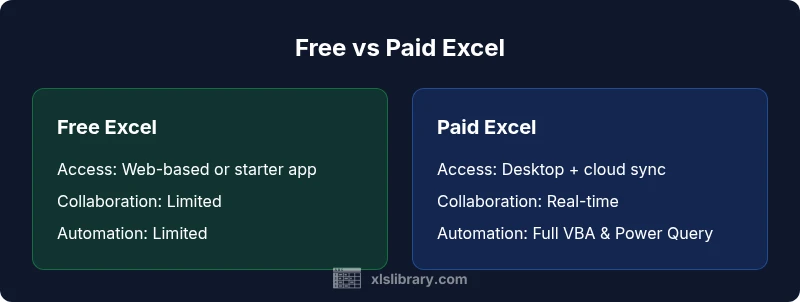
Free Excel vs Paid: Which Is Right for You in 2026
Explore the free Excel options versus paid licenses, including tasks, collaboration, security, and long-term value. A practical, data-backed guide from XLS Library to help you decide.


According to XLS Library, free Excel options can cover core spreadsheet tasks, while paid Excel plans unlock collaboration, advanced analytics, and robust security. The choice hinges on how you work: solo projects or team environments. This comparison highlights when free is enough and when investing in paid Excel delivers clear value.
Overview: Free vs Paid Excel options
In the modern knowledge economy, many Microsoft Excel users face a straightforward decision: go with a free Excel option or invest in paid licenses. Free Excel typically refers to no-cost routes such as web-based versions or limited desktop trials. Paid Excel covers full desktop software, premium cloud services, and official support. The practical impact of this choice extends beyond price; it affects task depth, reliability, governance, and risk. For aspiring and professional Excel users, the central question is not simply 'how much does it cost?' but 'how will this tool shape your workflow over weeks, months, and even years?' The XLS Library team emphasizes that the best answer depends on your actual use case, data complexity, and collaboration needs. At its core, free Excel is a solid starting point for learning, prototyping, and handling routine spreadsheets. Paid Excel, by contrast, unlocks a broader feature set, stronger security options, and a smoother path to scale across teams. This section outlines the landscape so you can map your own tasks to the right option.
Cost considerations and pricing models
Pricing models for Excel tooling range from free access to multi-user enterprise plans with per-user fees. Free options often come with limitations that affect long-term value: reduced storage, capped features, and restricted offline usage. Paid Excel licenses, by contrast, tie pricing to subscription tiers or perpetual licenses in some cases. The math is not just sticker price: consider maintenance, upgrade cycles, and the value of included services such as cloud storage, real-time collaboration, and priority support. For many teams, the break-even point—where paid plans deliver measurable productivity gains—depends on frequency of collaboration, data governance needs, and the complexity of models you maintain. The XLS Library analysis shows that even small teams often discover hidden costs in free paths—like workarounds, manual syncing, or duplicated efforts—whereas paid plans can consolidate these tasks under a single platform. In short, think in terms of total cost of ownership, not just upfront price.
Feature gaps: What you miss on free plans
Free Excel options typically omit some advanced data tools and governance features. You may encounter limits on the number of concurrent users, restricted access to premium connectors, and reduced automation capabilities (such as macros or Power Query in certain contexts). While basic formatting, charts, and standard formulas remain accessible, large datasets, complex models, and enterprise-grade analytics often require stepping up to paid Excel. For many learners, this is a natural learning path: start with free tools to master fundamentals, then migrate to paid options as your needs grow and you require more reliability and scalability.
Collaboration, cloud, and data security
One of the most material differentiators between free and paid Excel is how you collaborate and protect data. Free options frequently emphasize individual use or light sharing, with limited real-time coauthoring or governance controls. Paid Excel plans typically include robust cloud syncing, real-time collaboration with version history, and stronger security settings for sensitive datasets. If your work involves confidential client data, regulatory concerns, or multiple contributors, the security and governance features in paid plans become a compelling reason to upgrade. The tradeoff is cost and complexity, which some teams find worthwhile for the peace of mind and productivity gains.
Use-case fit: Solo work vs teams
Solo practitioners often thrive on free Excel for personal budgeting, hobby projects, or simple data tracking. The moment your work expands to multi-user collaboration, shared workbooks, or standardized templates used across departments, a paid Excel license becomes a strategic asset. Paid licenses not only enable simultaneous editing but also simplify audit trails, centralized templates, and policy enforcement. For teams, the ability to assign roles, control access, and manage updates centrally is a practical necessity, not a luxury. The choice should reflect your current scale and anticipated growth.
Migration, upgrades, and long-term value
If you start with free Excel and later encounter limits, upgrading is typically straightforward. Paid licenses offer longer-term efficiency gains through features like advanced data modeling, automation, and more reliable data integrity checks. The long-term value is often measured in reduced manual processes, fewer version conflicts, and better governance. When this value crosses the threshold of your organization’s budgeting and policy requirements, the upgrade becomes not just sensible but essential. The XLS Library analysis notes that many teams underestimate the cost of sticking with free tools as data needs evolve.
Practical decision framework
A practical framework for choosing between free and paid Excel starts with mapping your tasks to tool capabilities. List the formulas, data volumes, automation, and collaboration needs you actually rely on. Then compare delivery timelines, risk tolerance, and available budget. Try a two-step test: begin with free Excel for small tasks or personal projects; if you hit bottlenecks—offline access gaps, limited automation, or governance needs—pilot a paid license for a defined period. This approach keeps you agile while enabling evidence-based decisions. Remember to account for training time and change management as you scale usage across a team.
Alternatives and workarounds
If cost is the primary constraint, consider creating a focused set of templates in free Excel that maximize efficiency. Use cloud storage for sharing links instead of embedding large data files. For cross-platform collaboration, you can leverage browser-based editors for light editing, while saving heavier analyses for a paid environment. You can also complement free Excel with free or low-cost data visualization and reporting tools to cover gaps in analytics, though you should be mindful of data transfer steps and potential compatibility issues between tools.
Comparison
| Feature | Free Excel options | Paid Excel licenses |
|---|---|---|
| Cost | Free to use (no upfront cost) | Subscription-based or perpetual license (per user or organization) |
| Offline access | Limited to web-based or basic desktop features | Full offline desktop app with optional cloud sync |
| Real-time collaboration | Minimal or no real-time coauthoring | Robust real-time collaboration and version history |
| Macros and advanced data tools | Limited automation; basic formulas | Full VBA, Power Query, Power Pivot, and data modeling |
| Security and governance | Basic security; limited governance controls | Enterprise-grade security features and policy controls |
| Support & updates | Community support; slower official updates | Official support and regular updates included |
| Storage and syncing | Limited cloud storage or none | Included or scalable cloud storage with syncing |
Benefits
- Zero upfront cost makes experimentation risk-free
- Fast onboarding for basics and learning
- Simple for individuals with small, static datasets
- Low barrier to entry encourages experimentation
What's Bad
- Limited collaboration and governance features
- Missing advanced analytics and automation
- Potentially higher long-term costs if usage grows
- Inconsistent offline experiences across platforms
Paid Excel generally offers better long-term value for serious users
The XLS Library team recommends weighing your collaboration needs and data governance requirements. If you regularly share workbooks, manage complex models, or require offline access and tighter security, a paid plan is worth the investment. For light, individual tasks, free options can suffice.
People Also Ask
What exactly counts as 'free Excel'?
Free Excel refers to no-cost options such as browser-based editors or starter desktop versions. They support basic spreadsheets but may limit features, offline access, and collaboration. These tools are ideal for learning, simple tasks, and prototyping.
Free Excel means no-cost options with basic features, good for learning and simple tasks.
Can I rely on free Excel for professional reporting?
For routine reports and small datasets, free Excel can be sufficient. For complex analytics, large data models, or regulatory reporting, a paid license offers reliability, automation, and governance capabilities that reduce risk.
Free Excel can handle simple reports, but paid plans are better for complex analytics and governance.
Is it possible to upgrade from free to paid later?
Yes. Upgrading from a free to a paid license is typically straightforward and often involves a simple license activation or subscription upgrade. This allows you to preserve work and gradually expand capabilities as needs evolve.
Upgrading later is usually straightforward and preserves your work.
Do free Excel options support macros?
Most free options provide limited or no macro support. If automation through macros and advanced data tools is essential, a paid license is usually required.
Macros are typically limited in free options; paid licenses enable full automation.
How does data security differ between free and paid Excel?
Paid Excel plans offer enhanced security controls, access management, and audit trails suitable for teams and sensitive data. Free tools rely more on basic security measures and may place more responsibility on the user.
Paid plans provide stronger security and governance; free tools rely on basic protections.
Are there alternatives to Excel if I can't pay?
Yes. Free spreadsheet tools and open-source options can cover many tasks, especially for simple data work. For advanced analytics or team collaboration, you may still need to pair these tools with paid solutions or explore special offers.
Free tools exist for basic tasks, but advanced needs may require paid options.
The Essentials
- Assess your workload to choose between free and paid.
- Free Excel covers basics; paid Excel unlocks collaboration.
- Prioritize data security and governance for teams.
- Calculate total cost of ownership, not just upfront price.
- Plan for upgrade if team needs grow.