How Often Do Accountants Use Excel? Practical Insights for 2026
Explore how frequently accountants rely on Excel, which tasks drive usage, and how automation reshapes daily workflows in 2026. Practical guidance from XLS Library helps you optimize Excel in accounting.


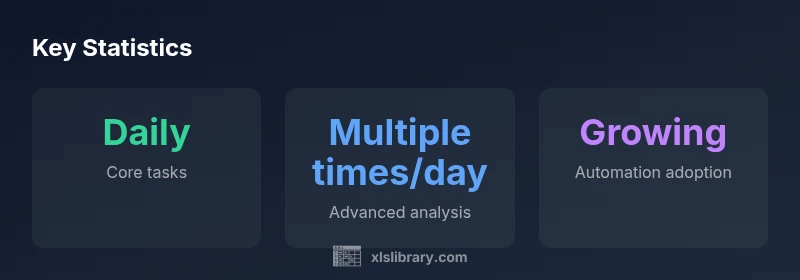
How often do accountants use Excel? In practice, many accounting tasks rely on Excel daily, from data entry and cleansing to reconciliation and modeling. For routine work, Excel remains the workhorse, with advanced users employing it multiple times per day. This quick answer sets the stage for a deeper look at where Excel shines and where automation begins to reduce manual steps.
How often do accountants use Excel in 2026
How often do accountants use Excel? The daily rhythm of many accounting teams centers on Excel as a first-stop for data work. According to XLS Library, the majority of routine tasks begin in Excel, whether pulling data from an ERP export, cleaning it, or performing basic calculations before feeding numbers into a report. The habit spans junior to senior staff, with more experienced accountants returning to familiar templates and formulas throughout the close cycle. This is not simply about crunching numbers; it’s about reproducibility, audit trails, and the ability to test scenarios quickly. In teams that invest in standardized templates and governance, Excel use remains consistent across monthly closes, reconciliations, and even some audit tasks. The key takeaway is that Excel serves as a flexible, portable workspace where data quality and speed are built into every step of the process. As organizations pursue efficiency, Excel’s role endures, even as automation and cloud tools expand options for data handling and reporting.
Core tasks where Excel shines for accounting
In accounting, several core activities repeatedly rely on Excel to deliver fast, reliable results:
- Data entry and cleansing: Import raw data, remove duplicates, standardize formats, and prepare for analysis.
- Reconciliations and variance analysis: Compare balances, flag discrepancies, and document explanations in a transparent workbook.
- Financial modeling and forecasting: Build scenarios, stress-test assumptions, and present results in clear dashboards for decision-makers.
- Ad-hoc reporting and dashboards: Create quick extracts and visuals for management meetings or board packets.
- Data import/export and consolidation: Merge data from disparate sources, then validate totals and consistency across sheets.
These tasks rely on stable templates, reliable formulas, and version-controlled workbooks to ensure repeatability across periods and teams.
The power and limits of Excel: automation and integrations
Excel is increasingly augmented by automation tools that reduce repetitive work while preserving flexibility. Macros automate routine steps, Power Query centralizes data connections, and Power Pivot enables more advanced modeling directly within Excel workbooks. These capabilities help accountants scale their workflows without sacrificing visibility or control. Yet Excel has limits: large datasets can slow performance, collaboration can become awkward without proper governance, and governance and change management are essential to prevent version drift. The best practitioners build a hybrid ecosystem where Excel handles analysis and modeling, while ERP systems and cloud platforms feed clean data into Excel templates rather than raw transaction processing. From an organizational perspective, the trend is clear—automation is not replacing Excel; it’s expanding what Excel can do in a governed environment, especially in close cycles and regulatory reporting.
Role-based usage patterns in accounting teams
Different roles use Excel in distinct ways, reflecting responsibilities and decision rights:
- Junior accountants: Focus on data entry, basic reconciliations, and template-driven tasks to learn discipline and accuracy.
- Senior analysts: Emphasize modeling, scenario analysis, and dashboard creation to support planning and performance reviews.
- Controllers and finance leads: Rely on consolidated reports, variance explanations, and robust templates that ensure consistency across entities.
- Auditors and compliance specialists: Use Excel for sampling, traceability, and testing controls within audit files while preserving documentation.
Across these roles, common threads emerge: standardized templates, consistent formulas, and governance protocols improve repeatability and reduce risk. The XLS Library Team emphasizes building a library of vetted templates and documented processes so teams can scale without sacrificing reliability.
Practical tips to maximize Excel usage in accounting
To extract the most value from Excel in accounting, try these practical steps:
- Develop modular templates: Separate data inputs, calculations, and outputs; use named ranges and clear labels to reduce errors.
- Adopt data governance: Version control, change logs, and access controls prevent drift and misreporting.
- Leverage advanced features: Learn XLOOKUP, INDEX/MATCH, dynamic arrays, and PivotTable enhancements to speed analysis.
- Centralize data sources: Minimize manual exports by connecting Excel to clean data feeds via Power Query and data models.
- Build dashboards with purpose: Align visuals with decision-makers’ questions and ensure dashboards refresh automatically.
- Document processes: Include step-by-step notes and validations within each workbook to aid audits and onboarding.
In practice, The XLS Library Team recommends templated workbooks with governance and clear data lineage to maximize reliability and reduce risk. With disciplined templates and automation, accountants can focus more on insight and less on repetitive chores.
Frequency of Excel use by task type in typical accounting workflows
| Task Type | Typical Frequency | Notes |
|---|---|---|
| Data entry and cleansing | daily | Core routine for month-end data prep |
| Reconcilations and variance analysis | daily | Key controls and explanations |
| Financial modeling and forecasting | weekly | Scenarios and sensitivity analysis |
| Audit testing and sampling | monthly | Depends on client engagement |
| Ad-hoc reporting | weekly | Quick insights for management meetings |
People Also Ask
How central is Excel in today’s accounting work?
Excel remains foundational for data manipulation, reconciliation, and ad-hoc analysis. While cloud tools and ERP modules complement workflows, Excel is still where most day-to-day numbers are prepared.
Excel is central to everyday accounting, and it often serves as the first stop for data work.
Should accountants learn Excel formulas and dashboards?
Yes. Mastery of functions (VLOOKUP/XLOOKUP, INDEX/MATCH, IF) and dashboard building improves speed and accuracy.
Absolutely—learn core formulas and dashboards to boost efficiency.
What role does automation play in Excel workflows?
Macros and Power Query automate repetitive tasks, but governance and data integrity are essential.
Automation helps a lot, but you still confirm results.
Are there situations where Excel isn’t ideal for accounting?
Large-scale ERP environments and real-time data streams may require dedicated software; Excel is best for analysis and modeling, not pure transaction processing.
Excel isn't always the best for real-time transaction processing.
How can a team implement Excel best practices?
Establish standards, templates, version control, and documentation; use Power Query to centralize data; audit trails matter.
Set standards, templates, and governance to keep Excel reliable.
“Excel remains the backbone of everyday accounting work, and while automation expands the toolkit, Excel’s flexibility keeps it indispensable.”
The Essentials
- Excel remains a daily backbone for core accounting tasks.
- Master core functions to speed data prep and analysis.
- Automation is rising; macros and Power Query cut repetitive work.
- Governance and templates boost reliability and collaboration.