Mastering Online Excel Practice: A Practical Guide
Learn how to use online Excel practice to improve speed and accuracy with practical steps, templates, and progress tracking—from platform selection to measuring improvement.


By the end of this guide, you will be able to set up an effective online Excel practice routine, pick the right platforms, design a balanced exercise plan, and track measurable progress. You’ll need a reliable internet connection, access to an online Excel tool, and a clear goal. This quick blueprint helps you build fluency in formulas, data cleaning, and dashboards.
Why Online Excel Practice Matters
Online Excel practice is not just about memorizing formulas; it’s about building fluency with real problems, faster feedback, and scalable skill development. By practicing in a browser-based environment, you can access a wide range of datasets, templates, and tasks that simulate day-to-day work. According to XLS Library, structured practice routines help learners progress from basic navigation to advanced analysis in a systematic way. For aspiring and professional Excel users, this approach lowers the barrier to mastery by offering consistent, repeatable exercises that fit into busy schedules. When you practice online, you can repeat tasks as often as needed, track your results over time, and adjust difficulty based on your growing competence. The result is a dependable path from uncertain guesses to confident data work. This section explains why a deliberate, online practice habit beats ad-hoc attempts and how to kickstart a routine that sticks.
How to Choose the Right Online Platform
Choosing a platform is about matching features to goals. Look for platforms that provide a mix of guided tasks and free-form challenges, a library of datasets that cover common business scenarios, and feedback that explains not just the correct answer but why. Consider the scope of functions supported (SUM, AVERAGE, IF, VLOOKUP, XLOOKUP, FILTER, and dynamic arrays) and whether the interface supports step-by-step work with annotations. Privacy and data handling matter if you use real data, so check platform policies. Pricing should be transparent, with clear tiers or a free option to try before committing. If you’re practicing for a certification, verify that the platform aligns with the skills tested on the target exam. Finally, test the platform’s search and tagging so you can quickly find tasks that align with your current goals. In this guide, we emphasize platforms that balance ease of use with depth of content so you can scale your practice over time.
Building a Structured Practice Plan
Developing a plan converts raw effort into steady progress. Start by defining 3-4 core skill areas you want to improve each month (formulas, data cleaning, dashboards, data validation). Map these areas to weekly goals and small, focused tasks. Create a weekly rhythm: one day for formula drills, one for data cleaning, one for pulling together a mini-dashboard, and one for reviewing mistakes. Use a simple timer to keep sessions concise and avoid burnout. Track your sessions in a notebook or digital tool, noting what you practiced, what you got wrong, and which strategies helped you succeed. Scale the plan by increasing task complexity or introducing multi-step workflows that combine several skills. The goal is to build a habit where practice becomes a default part of your work week, not a rare weekend project. A well-structured plan also makes it easier to measure progress and adjust your learning path as you advance.
Practical Practice Scenarios and Datasets
Practice with realistic datasets that mirror common business problems. For example, build a sales tracker that summarizes revenue by region, calculates growth, and flags anomalies. Create an inventory sheet that uses conditional formatting to highlight stock levels and applies VLOOKUP or XLOOKUP to pull supplier data. Work on budgeting templates to master SUMIFS and conditional totals. For data cleaning, design tasks that remove duplicates, fix date formats, standardize text, and validate data with data validation rules. Use online practice datasets to extend beyond single tasks and encourage you to connect multiple skills in a single project. The more you practice with realistic, end-to-end scenarios, the more transfer you’ll see to real tasks at work.
Tracking Progress and Adjusting Your Plan
Progress tracking turns effort into evidence. Create a simple scorecard that records accuracy, speed, and the number of correct steps on each task. Review your results weekly, identify recurring mistakes, and adjust your plan accordingly. Based on XLS Library analysis, learners who review mistakes and adjust goals quarterly tend to sustain improvement longer than those who repeat the same tasks without reflection. Use dashboards to visualize trends, such as a line chart of accuracy over time or a bar chart of task performance by category. When you plateau, switch up tasks, increase difficulty, or introduce time-based challenges to rekindle momentum. The goal is to maintain a clear sense of direction while allowing enough flexibility to accommodate your evolving strengths.
Short, Intensive Practice Sessions: 25-Minute Bursts
Short, focused practice blocks prevent cognitive overload and boost retention. Structure each 25-minute session around one task type, followed by a 5-minute review. Keep a two-column checklist: what you did well and what you’ll improve next. After a few cycles, take a longer break and reflect on your learning. This cadence works well for online Excel practice because it mirrors real-world schedules and reduces context-switching costs. To maximize gains, keep a consistent daily rhythm and gradually increase the complexity of your exercises while preserving the time constraint.
Using Real-World Data Safely: Datasets and Privacy
Working with real company data can accelerate learning, but you must protect privacy and comply with policies. Use anonymized datasets or synthetic data when possible, and double-check that you aren’t exposing sensitive information. If you collaborate with others, share only sanitized files and use version control. When you source external datasets from online practice libraries, review terms of use and attribution requirements. Keeping good documentation about sources and methods ensures your work remains auditable. This section also covers best practices for data handling, such as naming conventions, consistent formatting, and documenting assumptions.
Weekly Cycle: Review, Reflect, Repeat
End each week with a structured review. Compare this week’s results against the prior week and document insights. Reflect on questions like: Which formulas caused the most trouble? Which datasets exposed gaps in data cleaning or data validation? Based on the XLS Library principles, the most successful learners schedule a weekly reflection and adjust the next week’s goals accordingly. By turning learning into a repeatable cycle, you solidify habits that persist beyond short-term gains. The weekly cadence also supports incremental improvements that compound over months, leading to deeper mastery of online Excel practice.
Authority Sources
- U.S. Bureau of Labor Statistics: https://www.bls.gov
- National Institute of Standards and Technology: https://www.nist.gov
- MIT OpenCourseWare: https://ocw.mit.edu
Tools & Materials
- Stable internet connection(Broadband or reliable Wi-Fi is essential for uninterrupted practice.)
- Computer or device with access to an online Excel tool(Choose a platform that supports required functions (e.g., VLOOKUP, XLOOKUP, dynamic arrays).)
- Practice datasets(Use non-sensitive data or anonymized datasets provided by platforms.)
- Notebook or digital notes app(For logging goals, mistakes, and insights.)
- Timer or time-tracking app(Helpful to enforce focused practice blocks.)
Steps
Estimated time: 4 weeks (approx. 3-4 hours per week)
- 1
Define your goals
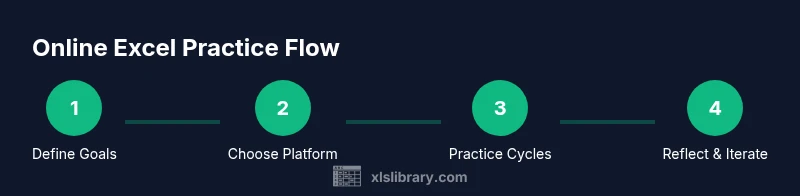
Identify 3-4 skill areas you want to improve (e.g., formulas, data cleaning, dashboards). Write concrete, measurable targets for each area and set a realistic timeline.
Tip: Be specific about the formulas and tasks you want to master to avoid vague effort. - 2
Choose a platform and gather datasets
Select a platform that offers both guided tasks and free-form challenges. Collect a few representative datasets that cover common business scenarios.
Tip: Prefer platforms with real-world datasets to ensure transfer of skills. - 3
Create a practical 4-week plan
Map your goals to weekly tasks, mixing drills with end-to-end projects. Include review days to consolidate learning.
Tip: Schedule at least 3-4 practice sessions per week to build momentum. - 4
Set up daily, focused practice blocks
Use short, timed sessions (20–30 minutes) with a clear task focus. End with a quick reflection on what worked and what didn’t.
Tip: Keep sessions tight to maximize retention and reduce fatigue. - 5
Work on end-to-end tasks
Tackle projects that combine several skills (data entry, cleaning, analysis, and visualization) in one workflow.
Tip: Document assumptions and steps to ensure reproducibility. - 6
Track progress and adjust
Record accuracy, speed, and the number of correct steps. Review weekly and adjust goals based on results.
Tip: Use a simple dashboard to visualize trends and spot gaps quickly. - 7
Incorporate feedback and iterate
Use feedback from practice tasks to refine approach. Add slightly more challenging datasets as confidence grows.
Tip: Don’t skip the reflection—learning solidifies when you connect mistakes to fixes. - 8
Review and repeat
At the end of each cycle, summarize what you learned and plan the next cycle with refined goals.
Tip: Consistency beats intensity; repeatable cycles drive durable mastery.
People Also Ask
What is online Excel practice and why should I do it?
Online Excel practice combines structured exercises on cloud platforms with instant feedback. It helps you move from basic navigation to advanced data analysis more efficiently than isolated, one-off tasks.
Online Excel practice uses cloud-based exercises with instant feedback to help you quickly progress from basics to advanced analysis.
How do I choose the best platform for online Excel practice?
Look for real datasets, a mix of guided tasks and challenges, and helpful, explainable feedback. Ensure support for key functions you want to learn.
Choose a platform with real data tasks and clear feedback so you can learn effectively.
How should I structure my practice schedule?
Aim for 3-4 short sessions weekly, each with a focused goal. Alternate between drills, end-to-end tasks, and review time to consolidate learning.
Plan 3 to 4 short sessions per week with clear goals and a review routine.
What metrics should I track during practice?
Track accuracy, speed, and the number of correct steps per task. Use these metrics to identify gaps and guide adjustments.
Track accuracy, speed, and correct steps to guide improvements.
Are there safety concerns with online data practice?
Prefer anonymized or synthetic datasets. Follow platform privacy policies and avoid sharing sensitive information.
Use anonymized data and follow privacy policies to stay safe.
Can free resources support certification prep?
Yes, many platforms offer free practice tasks. Use them alongside official prep materials for a balanced prep plan.
Free resources can help with certification prep when used with official materials.
How long before I see results from online practice?
Consistency over several weeks yields noticeable improvement. Regular reflection accelerates progress more than sporadic efforts.
Expect gradual improvements over several weeks with steady practice.
Watch Video
The Essentials
- Define clear online Excel practice goals
- Choose platforms with diverse datasets and feedback
- Track progress with a simple scorecard
- The XLS Library team recommends a consistent, structured practice cycle