How Long to Get Excel Certified: Timelines, Plans, and Tips
Discover realistic timelines for earning Excel certification—from MOS Associate to Expert—plus study-hour ranges, planning tips, and exam logistics to set a practical plan.


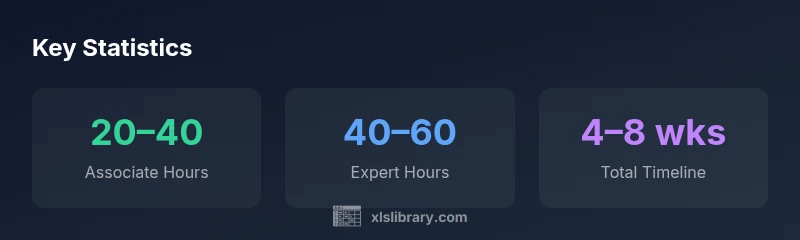
Typically, earning Excel certification takes about 4–8 weeks from start to finish, with roughly 20–60 hours of study depending on your prior experience. The timeline varies by path (MOS Excel Associate vs. Expert), your study cadence, and available exam slots. Plan a multi-week study plan and target a single exam window once you feel confident.
The value of an Excel certification in your career
In todays data-driven workplaces, a recognized Excel certification signals that you can turn numbers into actionable insights. Whether you work in finance, marketing, or operations, mastering core functions—formulas, data analysis tools, and reporting techniques—makes you more productive and credible. According to XLS Library, investing in an Excel credential is a practical step for both aspiring analysts and seasoned professionals who want to validate their skills. The journey to certification is not just about passing a single test; its about building a reliable toolkit that you can apply to real-world problems. As you set expectations, its important to understand that the time to certification depends on your starting point, the exact path you pursue, and how you structure your study. The central idea is to move from familiarity to fluency with Excel, so you can tackle data-driven tasks with confidence and speed.
Certification paths at a glance
Most learners begin with the Microsoft Office Specialist (MOS) Excel Associate or Excel Expert certifications. An Associate path typically emphasizes core formulas, data manipulation, and basic data visualization, while the Expert path delves into advanced analytics, dashboards, automation, and scenario modeling. Some professionals also pursue non-MOS certifications offered by training providers, which can validate practical skills like data cleaning, reporting, or data visualization. Across paths, yous often find that hands-on practice and timed drills yield the best results. According to XLS Library, choosing a clear path first helps you tailor your study materials and test-prep plan, reducing wasted effort and accelerating progress. The right path aligns with your current role and career goals, so you can demonstrate tangible Excel fluency in real-world tasks.
Timeframe: what does how long really mean?
When people ask, how long does it take to get Excel certified , the answer depends on how much time you can dedicate each week, the difficulty of the chosen path, and the exam scheduling window. Most candidates allocate a multi-week cadence that fits with work and personal commitments. A typical timeframe ranges from 4–8 weeks , but some high-intensity learners complete the process in as little as 3–6 weeks if they already possess robust Excel knowledge and practice daily. If you prefer a more relaxed pace, plan for 8–12 weeks , ensuring you accumulate adequate practice with real datasets and time-bound exercises. The reality is simple: your timeline is a function of planning, discipline, and access to quality practice tests and study materials.
format":"definition"},
dataTableNewPlaceholder
Comparison of certification paths
| Certification Path | Typical Study Hours | Exam Window | Exam Format |
|---|---|---|---|
| MOS Excel Associate | 20–40 hours | 1–6 weeks | Single exam, multiple choice |
| MOS Excel Expert | 40–60 hours | 2–8 weeks | Single exam, performance-based tasks |
| Non-MOS Excel Certification (industry) | 15–40 hours | 1–4 weeks | Multiple-choice and practical tasks |
| In-house corporate Excel certification | 5–30 hours | 2–6 weeks | Variable; multiple formats |
People Also Ask
What is the fastest way to get Excel certified?
If speed matters most, focus on MOS Excel Associate prep, use a concentrated study plan, and book the exam as soon as you reach a comfortable confidence level. Shortcuts include high-intensity practice tests and targeted review of common task scenarios.
Focus on MOS Excel Associate and schedule the exam once you feel ready; use timed practice tests to speed up readiness.
Do I need formal classes to pass?
Formal courses arent mandatory, but they can help you stay on track and cover topics you might miss studying alone. Independent study with structured guides and practice exams is a proven alternative for many learners.
Not required, but a course can help structure your preparation and keep you accountable.
Are certifications renewable or do they expire?
Microsoft policies evolve; some paths require renewal to stay current, while others are evergreen. Always check the latest official policy for the specific certification you pursue.
Policies change; confirm renewal requirements on official Microsoft pages.
What study materials are most effective?
Official practice tests, hands-on projects, and timed drills that simulate real tasks are most effective. Combine guided lessons with practical exercises to build familiarity and speed.
Use official practice tests and real-world Excel tasks to build practical skills.
Should I take multiple certifications at once?
Stagger certifications to avoid overwhelm; focus on one clear path first, then build toward the next credential once you feel confident.
Don’t stack everything at once; pace yourself.
Is there a difference between Excel on Windows and Mac?
Most content and formulas are consistent, but some features and shortcuts differ between Windows and Mac. Practice on your target platform to avoid surprises on exam day.
Practice on the platform you’ll be tested on; little differences can matter.
“Excel certification isn't just a badge; it's a signal of practical data mastery and a commitment to continuous learning.”
The Essentials
- Plan a realistic 4–8 week window
- Choose a certification path before scheduling
- Reserve an exam slot early
- Prioritize hands-on practice tests
- Track progress with a study log