Budget vs Actual Excel Template: A Clear Side-by-Side Comparison
Explore a practical comparison between budget templates and budget vs actual templates in Excel. Learn setup steps, best practices, and when to use each approach to improve forecasting and variance tracking.


TL;DR: A Budget vs Actual Excel Template is generally the better choice for active variance tracking. It links budget figures to actuals, computes variances automatically, and updates dashboards as new data arrives. If your workflow requires monthly re-forecasting and performance insights, this template minimizes manual reconciliation and saves time. For new users, start with a guided setup to avoid misalignment.
Context and purpose
In financial planning and performance management, choosing the right template matters. A well-designed budget vs actual excel template focuses on pairing planned numbers with real outcomes, enabling teams to see where forecasts diverge and why. According to XLS Library, practical templates for tracking performance rely on clean data, transparent variance formulas, and a structure that supports monthly or quarterly updates. The goal is to reduce manual reconciliation, shorten close cycles, and improve decision-making through timely, accurate insights. This article compares two common approaches—a traditional budget template and a budget vs actual template—and explains how to decide which setup fits your organization, data availability, and reporting cadence. The guidance here is tailored for aspiring and professional Excel users seeking practical, approachable strategies from the XLS Library Team.
What is a budget vs actual excel template?
A budget vs actual Excel template is a workbook that stores both planned (budget) figures and observed (actual) results in parallel. It automatically calculates variances, variances as a percent of budget, and, often, cumulative figures. This setup supports variance analysis, trend spotting, and performance reviews. The template can include dashboards, charts, and data validation rules to ensure consistency. In contrast, a pure budget template captures only the forecasted numbers without a built-in mechanism to track real performance over time. The choice depends on whether you need ongoing monitoring or simple, static planning. For teams that want ongoing visibility into performance, the Budget vs Actual approach is typically more effective.
Core differences between budget templates and budget-vs-actual templates
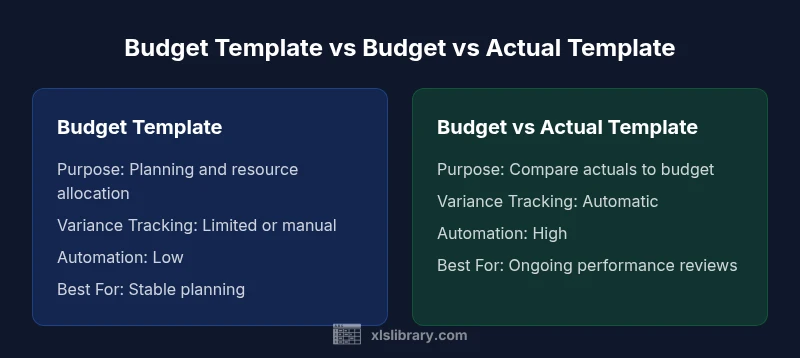
The core difference is the data model and the reporting outputs. A traditional budget template focuses on planning and resource allocation, often with static figures and limited post-launch updates. A budget-vs-actual template, by contrast, introduces a data link between forecasted values and actual results, enabling automatic variance calculations, real-time dashboards, and performance explanations. Other distinctions include:
- Data flow: Manual entry in budget templates vs live data connections in budget-vs-actual templates.
- Variance visibility: Minimal or no variance tracking in budget templates; comprehensive variance analysis in budget-vs-actual templates.
- Forecasting impact: Budget templates influence planning stages; budget-vs-actual templates influence ongoing performance management and governance.
- Governance: Budget-vs-actual templates tend to require stricter data governance and ownership to limit errors and misinterpretations.
When to use each template: scenarios
Both templates have use cases, but the decision hinges on reporting needs and organizational maturity. Use a traditional budget template when your process is primarily planning-focused, with annual or quarterly cycles and limited need for real-time comparisons. Use a budget-vs-actual template when your team must monitor performance continuously, compare outcomes to plans frequently, and adjust forecasts based on current results. For startups and fast-moving teams, budget-vs-actual templates support quick reads for leadership and more agile decision-making. For more stable environments, a robust budget template may suffice, with occasional variance analysis performed manually.
Key design considerations for budget vs actual templates
A strong budget vs actual Excel template balances clarity, accuracy, and ease of use. Consider these design principles:
- Clear data model: Separate sheets for Budget, Actual, and Variance with explicit links.
- Consistent time periods: Use uniform periods (months, quarters) and align with fiscal calendars.
- Strong data validation: Drop-down lists for categories, controlled units, and consistent naming.
- Transparent variance formulas: Use explicit calculations (Actual - Budget) and variance percent (Variance / Budget).
- Dashboards and visuals: Build charts that summarize performance at the department, project, or entity level.
- Documentation: Include a data dictionary and owners for data sources and formulas.
- Version control: Maintain a master file with a clear change log and scheduled reviews. These elements help ensure that the template remains reliable as data flows from multiple sources.
Step-by-step setup guide: how to build a budget vs actual template
- Define scope and periods: Determine which entities, departments, and timeframes to track. 2) Create the data model: Build separate sheets for Budget, Actual, and Variance with consistent column structure. 3) Link data: Use formulas to pull Actual data from your source systems or manual inputs; connect Budget values directly in the same workbook. 4) Implement variance logic: Add standard calculations (Variance = Actual - Budget; Variance% = Variance / Budget). 5) Build dashboards: Create summary views with key metrics and visuals. 6) Add governance: Protect sensitive sheets, set data validation, and document data sources. 7) Test thoroughly: Run end-to-end tests with sample data to verify accuracy and consistency.
Best practices for data quality and governance
Data quality is the backbone of a reliable budget vs actual template. Establish data ownership, define data sources, and implement checks to catch anomalies early. Use deterministic names for sheets and ranges, enforce data types, and schedule regular data refreshes. Perform monthly reconciliations between actuals and source systems to ensure data integrity. Document your data flows so new team members can understand the model quickly. Regular audits, cross-checks with finance staff, and clear versioning help sustain trust in the template over time.
Automating updates: links, queries, and dashboards
Automation reduces manual entry and errors. Use Excel features like Power Query to pull Actual data from external sources, and leverage named ranges to keep formulas stable as the workbook evolves. Set refresh intervals if the data source supports it, and design dashboards with dynamic filters to show variances by department, project, or period. If possible, centralize data inputs in a single source workbook or database to minimize reconciliation steps. Remember to validate imported data before it feeds dashboards and to log data lineage for transparency.
Common mistakes and how to avoid them
Avoid overcomplicating the model with too many formulas that are hard to audit. Keep a balance between detail and readability. Don’t skip data governance or rely on manual exports; always verify source data alignment to periods and categories. Inconsistent fiscal calendars, misnamed categories, and broken links break trust and slow decision-making. Establish a clear owner for the template and enforce change-control processes. Finally, test updates in a sandboxed copy before publishing to production.
Industry use cases and examples
Finance teams often use budget vs actual templates to track monthly performance against a profit and loss forecast, but the approach scales across departments such as operations, marketing, and project management. In manufacturing, budget-vs-actual templates help monitor material costs versus planned budgets, enabling faster corrective actions. In services organizations, they support headcount planning vs actual labor costs, supporting more accurate forecasting and staffing decisions. The underlying pattern is consistent: align planned numbers with actual results, quantify variances, and present insights clearly to stakeholders.
How to measure success with a budget vs actual template
Success is measured by accuracy of variance reporting, speed of month-end close, and the usefulness of dashboards for decision-makers. Track indicators like variance frequency, reconciliation time, and stakeholder satisfaction with reports. Use a simple, repeatable process with defined data owners and a documented data model. Continuous improvement should focus on reducing manual steps, increasing data automation, and refining variance explanations. The template should evolve with your organization, not become a brittle artifact of the initial setup.
Maintenance, ownership, and ongoing optimization
Assign a data owner for each data source and formula. Schedule regular reviews to refresh assumptions, validate data, and adjust the model for changing business needs. Periodically test the template with new data and scenarios to ensure resilience. Maintain a changelog with versioned releases and deprecations. Prioritize user-friendly design and easy onboarding for new team members. Ongoing optimization is about balancing rigor with accessibility so teams derive insights without getting bogged down in complexity.
Comparison
| Feature | Budget Template | Budget vs Actual Template |
|---|---|---|
| Purpose | Forecast planning and resource allocation | Compare actual results to budget and analyze variances |
| Variance Calculations | Limited or manual variance tracking | Automatic variance and variance % calculations |
| Data Source | Primarily internal budget inputs | Live links to actual data sources (where available) |
| Automation Level | Low to moderate, often manual updates | High, supports automated refresh and dashboards |
| Best For | Static planning with periodic reviews | Ongoing performance monitoring and coaching |
| Setup Complexity | Lower upfront setup | Moderate to high due to data connections |
Benefits
- Improved variance visibility for timely decisions
- Automates reconciliation and reduces manual work
- Supports ongoing forecasting and performance reviews
- Facilitates clearer communication with dashboards
- Provides a scalable model across departments
What's Bad
- Requires initial setup and data governance
- Can be complex for small teams or simple needs
- Dependency on data sources may introduce errors if not managed
- Maintenance requires ongoing ownership and discipline
Budget vs Actual Excel Template generally wins for ongoing variance tracking and forecasting.
If your goal is continuous performance monitoring, choose Budget vs Actual. It reduces manual reconciliation and improves decision-making. If you only need a static budget, a simple template may suffice, but miss opportunities for timely insights.
People Also Ask
What is a Budget vs Actual Excel Template?
A Budget vs Actual Excel Template stores both planned and observed figures in parallel, automatically calculates variances, and presents performance dashboards. It supports ongoing monitoring and faster course corrections. This is contrast to a pure budget template, which focuses on planning without built-in variance tracking.
A budget vs actual template stores planned and actual numbers side by side, calculates variances automatically, and shows dashboards for ongoing performance.
How do I set up a Budget vs Actual Template in Excel?
Start with separate Budget and Actual sheets, link them to a Variance sheet, and add variance formulas (Actual minus Budget and Variance percent). Build a simple dashboard to visualize variances by department or period. Add data validation and governance to keep the model reliable.
Create Budget and Actual sheets, link them for variance calculations, and build a simple dashboard for quick insights.
What are common pitfalls when using budget vs actual templates?
Inaccurate data sources, inconsistent period definitions, and broken links are common pitfalls. Neglecting governance and ownership leads to stale or unreliable numbers. Regular data validation and a clear change log help prevent these issues.
Be careful with data sources and period definitions; keep governance tight and validate data regularly.
When should I use a static budget template?
Use a static budget template when the focus is planning for a defined period with minimal need for ongoing performance checks. If you require ongoing variance analysis and forecasting adjustments, a budget vs actual template is more suitable.
Choose static budgeting for simple planning, or budget vs actual when you need ongoing performance tracking.
How can I automate data refresh for these templates?
Leverage Power Query or external data connections to pull Actuals into Excel. Keep the Budget values in a separate sheet and maintain consistent column structures. Schedule refreshes where possible and validate data after each refresh to ensure accuracy.
Use Power Query to pull Actuals automatically and keep your Budget data organized and refreshed.
The Essentials
- Set up a linked data model to auto-update variances
- Choose Budget vs Actual when variance tracking matters
- Automate data refresh to reduce errors
- Define data ownership for governance
- Use dashboards for quick performance insight