Excel-like Software Compared: Choosing the Right Tool for 2026
A thorough comparison of Excel-like software options—Excel, Sheets, Calc, and OnlyOffice—covering compatibility, automation, collaboration, and licensing to help you pick the right tool in 2026.


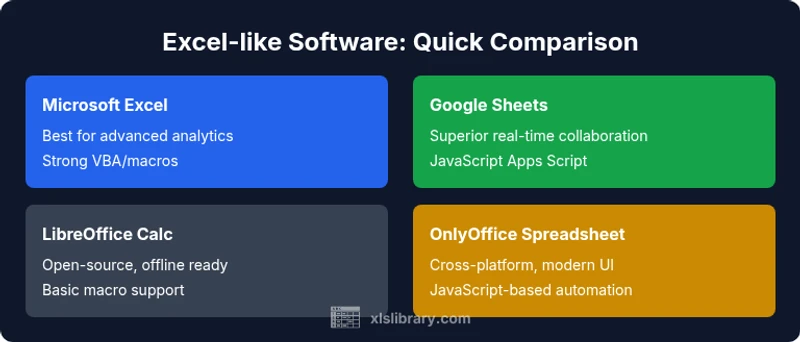
In 2026, the best Excel-like software depends on your needs: choose Excel for advanced analysis and macro support, Google Sheets for cloud collaboration, or LibreOffice Calc for a free offline option. For a balanced enterprise fit, OnlyOffice offers strong cross‑platform compatibility with modern features.
What "excel like software" means in 2026
In modern data workflows, the term excel like software refers to spreadsheet tools that resemble Microsoft Excel in their core interface, formula language, macro support, data visualization, and pivot capabilities. The XLS Library team notes that real-world buyers care most about compatibility with XLSX formats, automation potential, and collaboration features. As organizations shift toward hybrid work, the ability to edit, share, and audit spreadsheets across devices becomes as important as raw calculation power. In this landscape, the keyword itself captures a family of tools rather than a single product, and each option brings a different balance of cost, performance, and governance. This article evaluates those options through practical, real-world lenses to help you decide which is right for your specific use case.
Key differentiators for choosing among Excel-like software
The most critical differences fall into a few buckets: file compatibility and import/export fidelity; the breadth and maturity of the formula engine; scripting and automation support; collaboration and real-time editing; platform availability and offline access; and licensing or pricing models. Excel remains the benchmark for advanced analytics and macro support, while Google Sheets shines in live collaboration and cross‑team sharing. LibreOffice Calc appeals to cost-conscious users who need offline capability, and OnlyOffice attempts to balance cross‑platform operation with modern tooling. When evaluating options, map your use cases (data modeling, budgeting, dashboards, or simple data entry) to these differentiators to determine which tool minimizes friction for your team.
Scenario-based guidance: when to choose each option
- Enterprise data modeling and advanced analytics: Excel-like software with a rich formula language, Power Query, Power Pivot, and VBA remains the strongest choice for analysts who require complex data transforms and reliable performance on large datasets. If you rely on legacy Excel workbooks and existing VBA macros, Excel is often the safer bet.
- Real-time collaboration and distributed teams: Google Sheets excels in cloud-based, multi-user editing with comments and audit trails. It’s ideal for budgets, forecasts, and drafts that require rapid input from many stakeholders, especially when cost constraints are a factor.
- Offline-first or open-source preference: LibreOffice Calc is a solid offline option that does not require a subscription. It provides a familiar interface for basic to intermediate tasks and can be a pragmatic choice for schools or small teams with limited budgets.
- Cross-platform flexibility with strong governance: OnlyOffice Spreadsheet aims to deliver a balance of cross‑platform support, decent automation, and enterprise features. It’s worth evaluating if your IT environment requires a single vendor for docs, email, and collaboration tools. These scenarios illustrate how the landscape supports different priorities, from raw power to collaboration to cost containment.
Formula engines, macros, and automation across options
Formula engines define what you can compute and how efficiently you can automate tasks. Excel’s formula language remains the most feature-rich, complemented by VBA macros and, in the cloud, Office Scripts. Google Sheets uses a JavaScript-based Apps Script, which favors web automation and rapid prototyping but may lag behind Excel in depth of analytics. LibreOffice Calc supports its own macro languages (LibreOffice Basic and JavaScript) with decent portability, though macro compatibility across platforms can be uneven. OnlyOffice leans on JavaScript-based automation for scripting within its ecosystem and supports macros via its own framework. For teams that heavily rely on automation and custom workflows, evaluating the scripting surface area and security model is essential.
Collaboration, cloud, and cross-device access
Cloud-first options like Google Sheets offer superior real-time collaboration and seamless sharing controls, making them ideal for iterative budgeting, joint forecasting, or classroom environments. Excel (via Excel Online) provides strong co-authoring and version history, with the best downstream compatibility for enterprise workflows and data exchange. Desktop-first tools like LibreOffice Calc prioritize offline reliability, often with weaker cross-device synchronization unless paired with a syncing service. OnlyOffice attempts to bridge these worlds, delivering cross‑platform editing with a modern UI and enterprise-grade controls. In practice, choose a tool that aligns with your team's collaboration rituals, data governance needs, and IT policies.
Data capacity, performance, and reliability
When working with large datasets, Excel-based workflows generally outperform others due to optimized engines and mature data models (PivotTables, Power Query, and Power Pivot). Google Sheets scales more modestly, with practical limits on performance as file complexity grows. LibreOffice Calc is capable for moderate datasets but might stall with intensive transforms or large pivot tables. OnlyOffice sits in the middle, offering reasonable performance with robust document formats and offline options. For data-heavy teams, plan for the expected workbook sizes, consider a staging approach (local processing + cloud sharing), and ensure your chosen tool plays well with your data integration stack.
Pricing models and licensing realities in 2026
Pricing for Excel-like software ranges from free or low-cost options to enterprise-grade subscriptions. Google Sheets offers a free tier with a paid workspace plan for larger teams, while Excel is typically accessed via a Microsoft 365 subscription that bundles additional apps and cloud services. LibreOffice Calc is freely available as open-source software, with optional support or training. OnlyOffice provides a similar mix of free and paid tiers, often preferred by mid-sized teams seeking a consistent cross‑pl atform experience. When budgeting, consider not just per-user costs but also IT overhead, deployment complexity, training needs, and the value of cross‑department data interoperability.
Security, governance, and IT considerations
Governance matters more than ever for spreadsheets that drive critical decisions. Microsoft’s enterprise offerings emphasize role-based access, data loss prevention, and centralized policy enforcement in the cloud. Google Sheets leans on identity management and workspace controls, which are strong for collaboration but require careful policy setup to avoid data leakage. LibreOffice Calc’s offline emphasis creates fewer cloud governance concerns but demands separate controls for file sharing. OnlyOffice offers centralized admin consoles and encryption options designed for teams seeking uniform security across productivity apps. When selecting, map your IT policy requirements, data classification needs, and audit capabilities to the tool's security and governance features.
Authority sources and practical choices
To ground the discussion, consider consulting established authorities and vendor documentation. This section provides credible references for further reading and validation of the points above.
- National Institute of Standards and Technology (NIST): https://www.nist.gov
- Harvard University's data science resources: https://www.harvard.edu
- Bloomberg News: https://www.bloomberg.com
Practical decision checklist for teams
Use this quick checklist to guide your final choice:
- Do you prioritize advanced analytics and macro support? If yes, Excel remains the strongest candidate.
- Is real-time collaboration a core need? If yes, tilt toward Sheets or OnlyOffice with strong co-authoring features.
- Do you require robust offline access and cost control? Calc or LibreOffice may be the best fit.
- Are governance and security at the top of your list? Compare admin controls and data protection features.
- What is your total cost of ownership, including training and IT overhead? Choose a model that minimizes long-term costs while meeting requirements.
Final takeaway: balance power, collaboration, and cost for 2026
The best choice hinges on your primary use case: if you need maximum calculation depth and macro flexibility, Excel remains the default. For teams that value collaboration and cost efficiency, Sheets or OnlyOffice can deliver strong results. For offline resilience and no-cost options, Calc is worth considering. The optimal path is to align the tool with your data workflows, governance needs, and long-term collaboration strategy.
Feature Comparison
| Feature | Microsoft Excel (Microsoft 365) | Google Sheets | LibreOffice Calc | OnlyOffice Spreadsheet |
|---|---|---|---|---|
| Core file compatibility (XLSX, CSV, etc) | Excellent (native XLSX support) | Good (solid XLSX/CSV support; some macro limitations | Moderate (XLSX/CSV; fewer advanced features) | Good (XLSX/CSV; growing compatibility) |
| Scripting & automation | VBA/macros; Power Query/PivotTools | Apps Script (JavaScript-based) | LibreOffice Basic/JavaScript macros | JavaScript-based macros in OnlyOffice |
| Real-time collaboration | Strong co-authoring in Excel Online/365 | Real-time editing via Google Drive | Limited real-time in desktop Calc; web options exist | Co-editing via OnlyOffice |
| Offline availability | Strong offline desktop app | Web-first with offline on some plans | Fully offline desktop | Offline with cloud sync |
| Cross-platform availability | Windows/macOS/iPad/web | Web + mobile apps | Windows/Linux/macOS | Windows/macOS/Linux/Web |
| Pricing model | Subscription per user/month with bundled apps | Freemium core, paid enhancements | Open-source with optional support | Subscription or perpetual options |
| Advanced data tools | PivotTables, Power Query, Power Pivot | Pivot tables, basic data tools | Pivot tools present, less advanced | Pivot-like features; growing support |
| Add-ins & ecosystems | Large Office Add-ins ecosystem | Google Workspace add-ons | LibreOffice extensions | OnlyOffice marketplace |
| Security & governance | Enterprise security with admin controls | Admin controls via Google Workspace | Standard security; enterprise options vary | Enterprise controls; centralized IT management |
Benefits
- Strong formula language and macros for power users
- Excellent Excel file compatibility and enterprise support
- Large ecosystem and ongoing vendor investment
- Powerful data visualization and PivotTable capabilities
- Robust cloud collaboration for teams
What's Bad
- Higher total cost of ownership for enterprise features
- Steeper learning curve for advanced features
- Macro and scripting safety concerns require governance
- Cross-platform parity is imperfect across all options
Excel-like software: Excel remains the power user default, with Sheets excelling in collaboration, Calc serving offline/budget-conscious needs, and OnlyOffice offering a balanced cross-platform enterprise option.
For teams that prioritize advanced analytics and macro support, Excel is typically the strongest choice. If collaboration and cost efficiency are paramount, Google Sheets or OnlyOffice are compelling alternatives. LibreOffice Calc is a solid offline option for budget-conscious environments. Your final decision should map to data workflows, governance requirements, and IT constraints.
People Also Ask
What constitutes an 'excel like software'?
An excel like software is any spreadsheet tool that mimics Excel in its interface, formulas, macros, and data tools. It varies by depth of features, cloud capabilities, and scripting support.
Excel-like software means spreadsheet tools that resemble Excel in look, feel, and capabilities like formulas, macros, and data analysis.
Which tool is best for real-time collaboration?
Google Sheets is typically best for real-time collaboration due to its cloud-first design and instant sharing controls, though Excel Online also offers strong co-authoring in enterprise plans.
If real-time teamwork matters most, Google Sheets is usually the easiest option to collaborate live.
Can spreadsheets handle big data and complex analytics?
Excel, with PivotTables and Power Query, handles complex analytics well on large datasets, especially in desktop environments. Sheets and Calc have strengths for lighter analyses.
For big data and complex analytics, Excel is usually the most capable choice.
Are macros available in all excel like software?
Macros exist in several options, but their support and security models vary. Excel uses VBA; Google Sheets uses Apps Script; Calc has LibreOffice Basic, with differing levels of compatibility.
Macro support varies—check the scripting language and security policies before committing.
Is there a free or open-source Excel-like option?
LibreOffice Calc is free and open-source, offering a capable alternative for offline work, though it may lack some advanced Excel features and cross‑suite synchronization.
Yes, LibreOffice Calc is a solid free option for offline work.
The Essentials
- Prioritize your top need: power analytics vs. collaboration vs. offline use.
- Consider total cost of ownership, not just sticker price.
- Check macro/script compatibility with your existing workflows.
- Beware cross‑platform feature gaps and governance requirements.
- Evaluate a trial across your typical workbook sizes and use cases.