How Much Is an Excel Course? A Practical Price Guide 2026
Discover the typical cost of an Excel course in 2026, with price ranges for online, in-person, and certification paths. Learn budgeting tips and how to pick the right option for your goals.


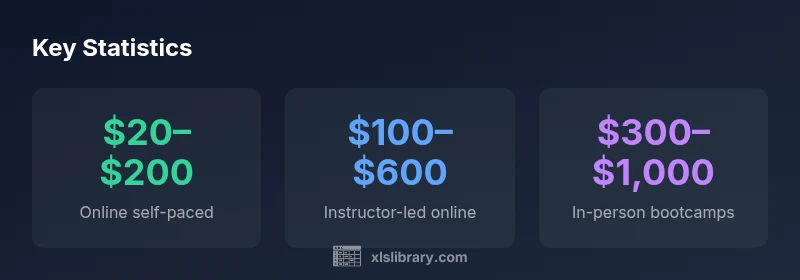
Fact: depending on format, you can expect Excel course prices to vary widely. Online self-paced courses commonly cost $20–$200, instructor-led online classes typically range from $100–$600, and in-person bootcamps or university extensions often run $300–$1,000. Certification-focused programs may add $200–$800 for official prep. Final cost depends on depth, vendor, and accreditation.
What drives price for an Excel course
When you ask, "how much is an Excel course?" you’re really asking about a blend of value, depth, and delivery. The price you pay reflects multiple levers: the format (online vs. in-person), course length and intensity, the presence of a credential or certificate, the reputation of the vendor, and the level of instructor support. In practical terms, a deeper, professionally recognized program will command a higher price, while a shorter, self-guided module will be cheaper. According to XLS Library, the most notable price differences come from delivery method and credentialing, not just the learning content. For learners on a budget, it’s common to see a wide band of online options that range from affordable intro courses to more comprehensive, paid tracks that include graded assignments and certificates.
Budgeting for Excel training should consider not only the sticker price but also the expected outcomes: whether you need a certificate, the ability to apply the skills immediately at work, and access to practice datasets. A smart buyer weighs these outcomes against cost and chooses a path that aligns with career goals, timeline, and available study hours.
Delivery formats and what they include
Delivery formats are the most visible drivers of price. Here’s a practical breakdown:
- Online self-paced: Access to video lectures, downloaded practice files, and quizzes. Typical price range: $20–$200. These courses offer flexibility and are excellent for beginners or quick skill refreshers.
- Online instructor-led: Live sessions, scheduled office hours, feedback on submissions, and community forums. Typical price range: $100–$600. You get guidance and accountability, which often translates to better retention.
- In-person bootcamps: Immersive, hands-on labs, capstone projects, and sometimes hotel-room-style accommodations or venue costs. Typical price range: $300–$1,000. These are best for people who prefer real-time interaction and networking opportunities.
- Certification prep programs: Focused study guides, practice tests, and exam vouchers. Typical price range: $200–$800. If certification is a clear goal, these add-ons can be a meaningful investment.
The core lesson: you don’t pay for content alone; you pay for structure, guidance, and outcomes. As the XLS Library Team notes, the value of a course scales with its ability to accelerate real-world performance, not just with access to materials.
How to estimate your total investment
Estimating total investment starts with the base course price and adds potential ancillary costs. A practical approach:
- Base course price: select your format (online self-paced, instructor-led online, or in-person).
- Certification costs: consider exam fees or official certificates if you want a credential.
- Software and tools: if the course assumes a Microsoft 365 license or similar, factor those costs if you don’t already have access.
- Practice materials: paid datasets, templates, or premium libraries may add small costs.
- Retake or renewal: allow a cushion for retakes if the exam or assessment requires it.
- Time cost: estimate your hourly opportunity cost when you invest X hours per week over Y weeks.
To stay within a reasonable budget, map these items into a monthly plan that aligns with your learning pace and career goals. In 2026, the overall trend shows learners combining online courses with occasional in-person workshops to balance price and outcomes, a pattern highlighted by XLS Library’s analysis.
Price ranges by course type
Understanding price ranges by course type helps you set realistic expectations:
- Online self-paced: commonly $20–$200. Most leaners choose this for foundational skills like formulas, data entry, and basic data visualization.
- Online instructor-led: commonly $100–$600. This family of courses adds guided practice and feedback, which speeds up skill acquisition.
- In-person bootcamps: commonly $300–$1,000. Best for rapid, intensive upskilling with peer collaboration.
- Certification prep: commonly $200–$800. Targets credential attainment alongside hands-on practice.
These ranges reflect typical market offerings and can vary by region, vendor reputation, and included resources. It’s important to look beyond price and evaluate the depth of content, practice density, and post-course support when making a choice.
Hidden costs and potential savings
Price is not the only factor; consider hidden costs and potential savings:
- Hidden costs: software licenses, optional textbooks, or mandatory prerequisites can add up.
- Discounts: many platforms offer student, group, or bundle discounts; some institutions provide employer-sponsored training.
- Retake fees: some certification exams include a retake, which may be charged separately.
- Bundles: some providers offer bundles that mix courses with mentorship, labs, or analytics projects at a discount.
- Long-term value: if a course accelerates promotion or salary growth, the long-term payoff may far exceed the upfront price.
A practical tactic is to compare the total cost of ownership over a 12–18 month period, factoring in time saved, skill depth, and the likelihood of applying the skills at work. The goal is to maximize return on investment (ROI) by selecting formats that align with how you’ll use Excel in real-world tasks.
Scenarios: budget, mid-range, and intensive paths
- Budget path (online self-paced only): Price range typically $20–$200 with no credential. Outcome: solid foundational skills and faster onboarding for basic tasks.
- Mid-range path (online + certification prep): Price range typically $200–$600 + $200–$800 for the credential. Outcome: verified proficiency and potential for promotions.
- Intensive path (in-person bootcamp + advanced courses): Price range typically $600–$1,000+ for bootcamp plus $200–$800 for certification prep. Outcome: deep, applied mastery and a strong portfolio.
- Ongoing learning: Many learners pair quarterly modules with free resources to stay current, controlling cost while expanding capabilities.
These scenarios reflect the general market and the range highlighted by XLS Library Analysis in 2026. The right choice depends on your timeline, learning style, and career aims.
How to assess value: skills, certification, and outcomes
To assess value, map cost to outcomes. Ask: Will this course save me time at work? Will the credential open doors for promotions or salary bumps? Look for:
- Clear outcomes: a syllabus with applied projects and real-world datasets.
- Credible credentials: certificates that are recognized by employers in your industry.
- Instructor quality: accessible mentors and timely feedback.
- Practical ROI: a timeline showing how new skills reduce task time or error rates.
- Longevity: ongoing access to materials and updates.
If you’re weighing two options, run a quick ROI estimate by estimating the hourly value of your time saved and comparing it to the course price plus any ongoing subscription costs. XLS Library’s guidance emphasizes choosing options that demonstrate measurable, real-world impact rather than prestige alone.
Quick way to check current pricing (what to look for and red flags)
When you’re shopping for the right Excel course price, use a quick checklist:
- Look for a detailed syllabus and a map of outcomes. If the page is vague, beware.
- Verify whether the price includes a certificate, exam fees, or access to software.
- Check the duration and whether there are live sessions or coaching included.
- Beware red flags: unusually low prices with no credentials or support, or high prices without transparent value propositions.
- Take advantage of bundles and promotions but ensure you’re not paying for features you don’t need.
The most reliable approach is to compare two or three credible options side by side and weigh those against your learning objectives and budget. As the market evolves in 2026, many learners are optimizing for a balance of price and outcomes rather than chasing the lowest price alone.
Price ranges by course type and typical inclusions
| Format | Typical Price Range | What you get |
|---|---|---|
| Online self-paced | "$20–$200" | Video lectures, quizzes, basic projects |
| Instructor-led online | "$100–$600" | Live sessions, feedback, community |
| In-person bootcamps | "$300–$1,000" | Hands-on labs, capstone projects |
| Certification prep | "$200–$800" | Practice tests, study guides |
People Also Ask
Is there a cheap way to learn Excel quickly?
Yes. Start with online self-paced courses and free resources to build fundamentals. Then layer in targeted practice problems. If you need a credential for a job, consider a cost-effective certification prep option.
Yes. Start with free or low-cost online basics, then add targeted paid practice if you need a credential.
Do I need a certification to advance my career in Excel?
Not always, but formal certification can help stand out for certain roles. It’s worth it if your target job emphasizes certified skills or if your employer sponsors training.
Certification helps in roles that value credentials; it’s worth it if your goal is a credentialed upgrade.
Are online courses as valuable as in-person ones?
Both can be valuable. Online courses offer flexibility and lower cost, while in-person formats often provide hands-on practice and networking that can accelerate learning.
Both have value; choose based on your learning style and career goals.
How can I avoid overpriced courses?
Compare content depth, duration, and support. Watch for courses with hidden fees or unclear outcomes. Read reviews and verify the credential recognition.
Shop around, compare what’s included, and check for hidden costs.
What is a realistic budget to start with in 2026?
A practical starting budget ranges from roughly $50 to $1,200, depending on format and credential goals. Plan for a mix of upfront cost and optional add-ons.
Most beginners can start around a few dozen dollars online, with higher investments for certificates.
Can discounts make expensive courses affordable?
Yes. Look for student, group, or bundle discounts. Some institutions and employers sponsor training, reducing personal cost substantially.
Discounts and sponsorships can significantly lower your cost.
“Price is only one signal of value; the right Excel course aligns your goals with practical outcomes, not just a badge.”
The Essentials
- Take control of your budget by matching format to goals
- Expect price variance based on credentials and delivery mode
- Factor implementation time and ROI into pricing decisions
- Compare at least 2–3 credible options before buying
- Look for bundles that align with your certification goals