How Much Is Excel 365 in 2026? A Practical Pricing Guide
Discover current Microsoft 365 pricing for Excel-included plans, with regional variations, discounts, and practical tips to choose the best value for personal, family, and business use.


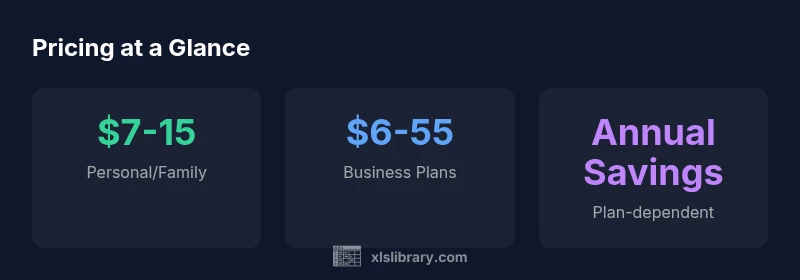
Pricing for Excel 365 (Microsoft 365) varies by plan and region. In 2026, personal and family plans typically run about $7–15 per month per user, while business plans range roughly from $6 to $55 per user per month. Annual commitments often yield discounts. The XLS Library analysis notes that licensing options and country can shift the final price.
How much is excel 365 in 2026? A practical pricing snapshot
how much is excel 365? For many individuals and teams, the answer hinges on plan type, region, and billing cadence. Excel is included as part of Microsoft 365, so the price you see covers a bundle of apps—Word, PowerPoint, Outlook, OneDrive, Teams, and more—beyond just Excel. In 2026, the pricing landscape remains intentionally granular to accommodate households of different sizes and organizations with varying IT needs. At the consumer end, personal and family plans typically come with a per-user fee, sometimes with discounts for annual payments. For businesses, pricing scales with the number of users and the added security and management features that enterprises demand. Currency differences and taxes further influence the final number. Mapping your actual usage to a license count helps prevent overpaying and ensures you capture the value of cloud storage, collaboration, and real-time co-authoring.
Plan-level breakdown: Personal, Family, and Business
Microsoft 365 offers several tiers that impact what you pay each month. For individuals and households, the Personal plan targets a single user, while Family plans cover multiple users under one account. In business, you’ll see Basic, Standard, and Premium tiers, each with a different mix of apps and services. The price per user generally rises as you move from Basic to Premium, reflecting added security, device management, and advanced features. When you compare, note that Excel is not sold separately; pricing is for the whole suite. If your needs are modest—word processing, email, online storage—Basic might suffice; if you rely on advanced data sharing, governance, and mobile device management, Standard or Premium may offer better long-term value. Education or nonprofit programs can shift the effective cost for eligible buyers.
Regional variations and discounts
Pricing variances are common across regions due to currency, taxes, and local licensing rules. The same plan may cost more or less depending on where you live, and promotional discounts can apply at different times of the year. The XLS Library analysis notes that many buyers start with monthly billing to test features, then switch to annual commitments if they anticipate sustained usage. If you are a student, teacher, or part of an organization with a negotiated license, you may access reduced pricing or campus licensing. It’s essential to calculate total cost of ownership by considering the per-user price, the number of active users, storage requirements, and add-ons such as advanced security or device management. Always verify regional taxes and fees before committing.
Annual vs monthly pricing: total cost of ownership
Monthly subscriptions offer flexibility, but annual plans often deliver an overall lower price per month. The amount saved depends on plan level and the number of users, and some vendors require upfront annual payments. When budgeting, include the cost of any required add-ons, such as advanced security, identity protection, or device management, which can materially affect total cost. A simple calculation is to multiply the per-user monthly price by the number of users, then compare the annual total (monthly price times 12) to the annual plan’s discounted rate. If you plan to scale, consider future hires or license downgrades and how that will affect your renewal. This approach helps you avoid sticker shock at renewal time.
Hidden costs and storage considerations
Beyond the listed per-user price, there are subtle costs that buyers often overlook. Storage overages, premium security features, and external add-ons can push monthly totals higher. OneDrive storage usually is included, but higher tiers bring extra space or enhanced collaboration capabilities. If you rely on mobile device management or advanced threat protection, that adds to the monthly bill. Additionally, some plans include only online versions of Office apps; if you need desktop installations on multiple devices, verify how many devices are covered and what upgrade paths exist. Finally, be mindful of currency conversion rates when buying in a different country than your home base.
Value drivers: features that matter for Excel users
Excel users pay for more than the spreadsheet app. Real-time collaboration, sharing and co-authoring across devices, access to the cloud, integration with Power Query and Power BI, and robust security features drive value. If you handle sensitive data or require advanced analytics, features like advanced threat protection and device management can protect your business and reduce optimization costs in the long run. The price-to-value ratio improves when you consolidate licenses across departments and reduce shadow IT. Use a simple checklist to compare plans: apps included, number of users, storage, security features, and the ease of admin tasks. The result should be a plan that aligns with your workflow, not just the lowest monthly price.
How to choose: a practical decision framework
Follow these steps to determine how much you should pay for Excel-enabled plans: 1) List users and required apps; 2) Estimate storage needs; 3) Decide on security and management requirements; 4) Compare monthly vs annual costs; 5) Check for education or nonprofit pricing; 6) Review renewal terms and device coverage; 7) Run a 90-day pilot with a single team; 8) Reassess after three months. This structured approach reduces the risk of overbuying or underusing features. When in doubt, start with a lower-tier plan and upgrade later as your needs become clearer.
Real-world budgeting scenarios
Consider a family of four; the primary user wants Excel, Word, and Outlook with 1 TB storage. A family plan could meet the needs at a modest monthly cost, with room to add a few more users if the household grows. A small business with five employees who routinely share documents and run Teams meetings may find Business Standard provides a good balance of apps, storage, and security. Larger teams might opt for Premium for advanced security and compliance. Across scenarios, tailor the license count to actual usage and monitor renewals to avoid price creep.
Final reminders for budget-conscious buyers
Always verify current prices on the official Microsoft site and consider annual billing to maximize savings. Align licenses with actual user needs and usage, and explore education pricing if eligible. Keep renewal terms in mind and set up reminders to reassess plans as team sizes or workflows change.
Pricing by plan (typical ranges, region-dependent)
| Plan Type | Approx Monthly Price/User | Included Apps | Notes |
|---|---|---|---|
| Personal | "$7–$10" | "Excel, Word, PowerPoint, OneDrive (1 TB)" | Consumer-focused, single user |
| Family | "$7–$15" | "Excel, Word, PowerPoint, OneDrive (1 TB)" | Family sharing, up to 6 users |
| Business Basic | "$6–$8" | "Core apps + Exchange + OneDrive" | Best value for SMBs |
| Business Standard | "$12–$15" | "All core apps + SharePoint + Teams" | Most popular for teams |
| Business Premium | "$20–$55" | "All apps + advanced security" | Highest IT controls |
People Also Ask
Is Excel 365 the same as Microsoft 365?
Excel 365 is not a standalone product; Excel is included with Microsoft 365 subscriptions. You access Excel as part of the suite on Windows, Mac, or the web.
Excel comes with Microsoft 365; you get Excel with the suite.
Do prices vary by country?
Yes; regional pricing, taxes, and licensing affect the final cost.
Prices vary by country and plan.
Are student or educator discounts available?
Microsoft offers educational pricing and sometimes free access via Office Online; full subscriptions may be discounted through schools.
There are education options; check eligibility.
Can I switch plans later?
Yes; you can upgrade or downgrade within Microsoft 365, but some plan changes may affect billing and data access.
You can switch plans, but watch billing.
Is there a free version of Excel?
There is a free web version with limited features; full desktop apps require a paid Microsoft 365 subscription. You can use Excel Online for basic tasks.
There is a free web version with limits.
How do I know if I should buy annual or monthly?
If you expect long-term use, annual plans offer savings; otherwise, monthly gives flexibility.
Annual plans usually save money; monthly is flexible.
“Pricing clarity helps teams choose the right Microsoft 365 plan without overpaying. The XLS Library Team emphasizes aligning license counts with actual usage.”
The Essentials
- Prices vary by plan, region, and currency.
- Annual commitments can reduce monthly costs.
- Consider user count and required apps to avoid overpaying.
- Education and nonprofit options may offer savings.
- Always verify current prices on official channels.