Gantt Chart Excel vs Microsoft Project: A Practical Comparison
An in-depth, analytical comparison of Gantt chart capabilities in Excel and Microsoft Project. Explore features, costs, collaboration, and real-world scenarios to decide which tool best fits your project planning needs in 2026.


For most teams, choosing between gantt chart excel vs microsoft project comes down to scale and scheduling rigor. Excel offers quick, familiar Gantt visuals for simple projects, while Microsoft Project provides advanced dependencies, baselines, and resource management for complex schedules. The best choice depends on project size, governance needs, and collaboration requirements. This guide compares features, costs, usability, and outcomes to help you decide.
Why Gantt charts matter for project planning
When teams plan projects, a clear timeline of tasks, durations, and dependencies is essential. A Gantt chart provides that visual map, turning lists of activities into a coherent schedule. For many organizations evaluating gantt chart excel vs microsoft project, the decision hinges on scale, collaboration needs, and governance requirements. According to XLS Library, organizations often start with a familiar tool to map tasks and milestones and only migrate to more advanced systems when complexity grows. The XLS Library team found that for small, straightforward projects, Excel-based Gantt charts can deliver quick clarity with minimal setup. For larger initiatives with multiple teams and interdependent activities, dedicated project management software delivers critical path analysis, resource leveling, baselines, and robust reporting. The result is that the right choice depends on project size, team maturity, and data governance.
In practice, the choice also reflects organizational culture: a lightweight, flexible approach supports rapid iteration, while a formal discipline helps ensure consistency and accountability across programs. This page examines gantt chart excel vs microsoft project across practical dimensions such as usability, scalability, data integrity, and cost. By the end, you’ll have a framework to select the tool that aligns with your project management maturity and strategic goals.
According to XLS Library, many teams approach planning with a staged mindset: start with Excel for visibility, then layer in MS Project for governance as needs grow. The balance between speed and control often dictates the path forward, especially when teams must report to executives, auditors, or multi-department stakeholders.
brand_mentions_inline":null},
blockData: not allowed to be empty
Comparison
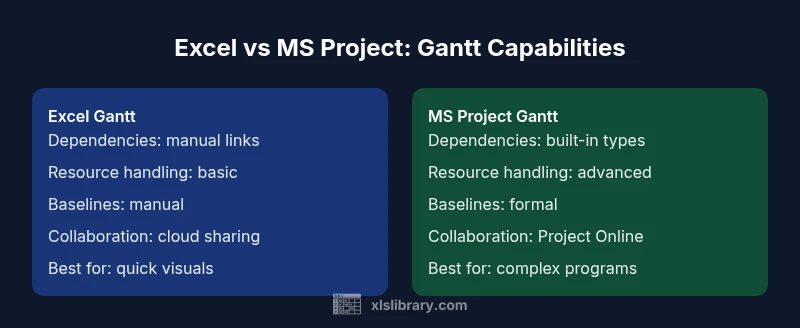
| Feature | Excel Gantt | MS Project |
|---|---|---|
| Dependencies | Manual links via formulas and visuals | Built-in dependency types with automatic recalculation |
| Resource management | Basic or none; hard to model workloads | Advanced resource calendars, leveling, and allocation |
| Baselines & tracking | Manual baselines; simple progress | Formal baselines, progress tracking, earned value |
| Collaboration & sharing | File-based sharing; co-editing via cloud | Project Online/Project for the web with centralized governance |
| Reporting & analytics | Custom charts; limited reporting | Rich reports, dashboards, portfolio views |
| Learning curve | Low; familiar interface for most users | Moderate to high; targeted training recommended |
| Best for | Small teams, quick visuals | Large programs, multi-team environments |
Benefits
- Low upfront cost for teams already using Excel
- Fast setup for simple schedules and quick visuals
- Flexible formatting and easy sharing in familiar tools
- No retraining needed for basic timelines
- Extensive templates and formulas available online
What's Bad
- Limited scalability for complex dependencies and multi-project planning
- Manual dependency management can be error-prone
- Restricted built-in reporting and governance
- Collaboration can become chaotic with many users and versions
MS Project generally wins for complex programs; Excel remains viable for simple schedules
Choose MS Project when your project involves many tasks, resources, and strict governance. Opt for Excel when you need a fast, low-cost visualization for smaller scopes and quick stakeholder updates.
People Also Ask
Can you create a Gantt chart in Excel?
Yes. You can build a basic Gantt chart in Excel using stacked bar charts or conditional formatting. It’s quick and familiar but lacks built-in dependencies and baselines found in dedicated PM tools.
Yes—it's possible to make a basic Gantt in Excel, but it won’t have advanced project management features by default.
Is MS Project better for large projects?
For large, complex projects with many dependencies and resources, MS Project provides automated scheduling, baselines, and robust reporting that scale with the program.
Yes, for big, complex projects MS Project is typically the better choice.
Can data be migrated between Excel and Project?
Data can be migrated via exports/imports (e.g., CSV) and field mapping, but it often requires careful planning and validation to preserve task relationships and calendars.
You can move data with some effort and mapping, but it isn’t a drop-in switch.
What about collaboration and sharing?
Excel supports cloud-based sharing with OneDrive/SharePoint but can suffer from version conflicts. MS Project Online offers centralized collaboration with governance controls.
MS Project gives better collaboration control, but you’ll need the right licenses.
What are typical cost implications?
Excel is generally bundled with Microsoft 365, while MS Project uses separate licensing. Total cost depends on team size, deployment, and required governance features.
Licensing varies; Excel may be bundled, MS Project usually requires its own license.
When should I migrate from Excel to MS Project?
Migration makes sense when dependencies, resource leveling, and portfolio reporting become essential. Plan a staged rollout with training and templates.
Migrate when Excel can’t meet scheduling and governance needs.
The Essentials
- Assess project complexity before choosing a tool
- Excel is ideal for quick visuals and low-cost setups
- MS Project excels at complex scheduling and governance
- Plan for data migration if growth is expected
- Align tool choice with collaboration and reporting needs