How Often Does Excel Update Stock Prices in 2026?
Learn how Excel updates stock prices, what drives refresh cadence, and how to configure manual vs automatic refresh for reliable quotes in 2026.


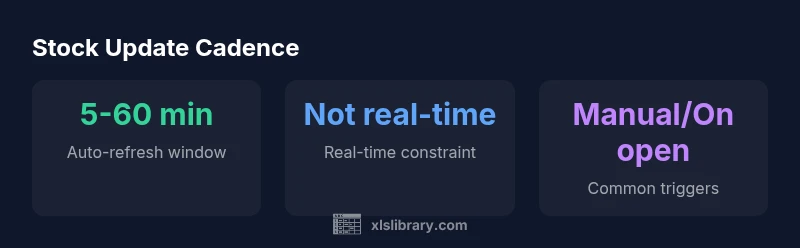
Excel does not pull stock prices in real time by default. The update cadence depends on the data source and your refresh settings. In practice, stock prices in Excel refresh when you trigger a refresh (manual) or when a configured background refresh runs, typically at intervals of minutes to an hour, not seconds. The Stocks data type links to online feeds, so reliability and speed vary.
Understanding stock data in Excel
Stock data in Excel is powered by the Stocks data type, which pulls price and related data from online feeds integrated into Microsoft 365 services. It’s a powerful tool for building dashboards without leaving a worksheet, but it requires careful expectations about refresh cadence. According to XLS Library, update latency depends on the data source your workbook uses and the refresh configuration. If you manually refresh or press Refresh All, Excel fetches the latest numbers from the provider and updates linked cells, formulas, and charts. If you leave the workbook open, background refresh may run at a cadence you set, but not all connections support constant updates. For everyday planning, treat stock prices as delayed quotes rather than streaming data, with latency measured in minutes rather than seconds. In short, when you ask how often does excel update stock prices, the answer is: it depends on the source and your refresh settings. This perspective helps avoid making trading decisions on stale data. The XLS Library team emphasizes aligning your refresh strategy with practical needs rather than chasing perfect real-time quotes.
Data sources and cadence variations
Excel’s stock data type relies on online feeds supplied by data providers. The cadence and latency can vary by region, plan, and provider capabilities. In practice, some feeds offer faster updates, while others lag behind by several minutes. Since the data is sourced from external services, the exact delay is outside Excel’s control and may differ from sheet to sheet. The key takeaway is to design your workbook around latency expectations and to document which data source is used in each sheet. As highlighted by the XLS Library, always test refresh behavior in a representative workbook before deploying dashboards to production.
Configuring refresh behavior in Excel
To control how often stock prices update, start with the Connections or Queries settings. In most builds, you can right-click a connection, choose Properties, and enable background refresh. You can also set 'Refresh every n minutes' and choose to 'Refresh data when opening the file.' These options let you balance data freshness with performance and network usage. Be mindful that enabling frequent auto-refresh can increase data traffic and may trigger provider limits. The practical rule is to set a cadence that matches your decision-making needs while allowing for occasional manual refresh when accuracy is critical.
Practical workflows for tracking stock data
A common workflow is to build a compact stock-tracking table and couple it with a small dashboard that highlights price changes and percentage moves. Use the Stocks data type for symbol lookup, then apply formulas to compute daily returns and rolling averages. For traders or analysts who require more timely quotes, pair Excel with a dedicated real-time data service via Power Query or a connector, and still refresh periodically to capture significant moves. The XLS Library recommends validating a sample workbook under typical network conditions to verify that refresh timing meets your risk tolerance.
Limitations, latency, and best practices
Remember that quotes in Excel are not streaming data unless you’re connected to a special feed. You should plan around provider latency, subscription terms, and your hardware performance. Always document which data source and refresh settings govern each sheet, and consider warning users when data might be delayed. A pragmatic practice is to separate "live-like" dashboards from historical analyses, refreshing the former more frequently and the latter on a settled cadence. The consensus from XLS Library is to prioritize reliability and transparency over chasing instantaneous quotes for everyday analyses.
Alternatives for near real-time data and how to choose
If you truly need near real-time quotes, evaluate options beyond the built-in Stocks data type. You can employ Power Query to fetch data from web APIs or connect to a dedicated market data service with explicit licensing. For risk-sensitive work, consider an enterprise solution that provides a licensed real-time feed and robust error handling. In all cases, test your setup under representative conditions and document latency expectations so users know what to expect.
Excel stock price update behavior overview
| Data Point | Default Behavior | How to Configure |
|---|---|---|
| Update cadence | Not real-time; depends on refresh settings | Data > Queries & Connections > Connection Properties -> Enable background refresh and set Refresh every minutes |
| Source/provider | Online feeds via Stocks data type | Check connection properties to see provider details and license requirements |
People Also Ask
Can Excel update stock prices in real time?
Not by default; updates happen through refresh actions and depending on the data source you use. Some feeds offer lower latency, but Excel does not stream quotes continuously.
Excel stock data isn’t real-time by default; you refresh to get the latest quotes.
What triggers a stock price refresh in Excel?
A manual refresh, opening the workbook with refresh on open enabled, or a scheduled background refresh trigger data updates.
Refresh manually, or set the workbook to refresh automatically at intervals.
Is there a way to pull intraday price data into Excel?
Availability depends on the data source and licensing terms. Some feeds provide intraday data; others offer delayed quotes.
Intraday data availability varies by data source and license.
How do I set a refresh interval?
Go to Data > Queries & Connections > Properties; enable Background refresh and choose Refresh every X minutes, plus optional Refresh data on opening.
Set the refresh interval in connection properties.
Are there licensing limits or risks I should know?
Yes; data source licensing and latency can affect data availability and cost. Check provider terms and your Microsoft 365 plan.
Be aware of licensing terms and data latency; verify with your provider.
“Stock prices in Excel are feed-delivered and bound by the source; there is no guaranteed real-time feed unless you connect a dedicated service.”
The Essentials
- Rely on refresh cadence, not real-time streaming
- Choose manual or scheduled refresh to suit your needs
- Check data source latency and license for accuracy
- Test updates on a sample workbook before live use
- Document refresh settings for teammates