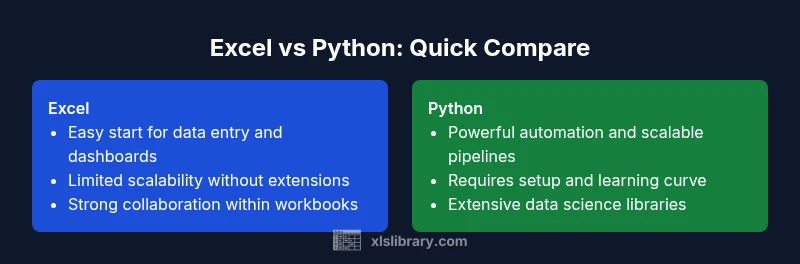
Is Excel Harder Than Python? A Practical Comparison
This XLS Library comparison examines whether is excel harder than python, weighing learning curves, automation, data handling, and real-world use cases for learners and professionals.


TL;DR: For many everyday data tasks, Excel is easier to pick up, but Python unlocks scalable automation and advanced analytics. The question is is excel harder than python is highly task-dependent: ad-hoc analysis and dashboard work favor Excel, while repeatable pipelines, large datasets, and reproducible workflows favor Python. The best approach is to start with Excel basics for quick wins and progressively add Python for automation when your workload grows.
Is Excel harder than Python? A practical reality check
The question is often framed as a binary choice, but the real difference lies in task type, learning goals, and long-term needs. The phrase is excel harder than python surfaces early in conversations about data work, yet the answer depends on what you want to accomplish. Excel offers a gentle entry point with familiar spreadsheet metaphors, immediate visual feedback, and a low barrier to entry for basic data entry, formatting, and simple formulas. Python demands learning syntax, setting up an environment, and understanding libraries, which can feel intimidating at first. According to XLS Library, clarity around goals matters more than the tool itself: Excel shines in quick analyses and collaborative worksheets, while Python shines in scalable automation and complex transformations. This article uses practical scenarios to illustrate where the difficulty actually lies, and how to bridge the gap when your needs outgrow a workbook.
The learning curve: where Excel shines and where Python shines
Learning curves are not binary; they are a spectrum shaped by prior experience, available time, and the complexity of tasks you tackle. For many beginners, Excel’s GUI, built-in functions, and templates offer fast wins—think SUM, AVERAGE, FILTER, and simple pivot tables. These features enable rapid experimentation and iteration without writing code. Python, by contrast, demands comfort with syntax, debugging, and dependency management. However, Python pays dividends as projects scale: it enables automation, parameterized workflows, and consistent results across multiple files or data sources. From a skills-transferable perspective, the mental model you develop in Python—arrays, loops, conditionals, and functions—often improves your capability even when you return to Excel for ad-hoc work. The XLS Library team notes that the perceived difficulty gap narrows when you leverage Python for backend data tasks and Excel for front-end exploration; each tool complements the other in a modern data stack.
Task complexity and scalability: from ad-hoc to automation
Ad-hoc tasks in Excel are fast to spin up: you can slice, dice, and visualize data with minimal setup. As tasks grow to require repeatable steps and multi-file pipelines, the limits of a workbook become apparent. Python shines here with scripts, modules, and version-controlled code that can reproduce results precisely, scale to bigger datasets, and be shared as part of a reproducible workflow. The challenge in Python often lies in initial setup and ongoing maintenance—installing packages, managing environments, and handling errors in long-running processes. Yet once a workflow is automated in Python, you gain consistency and audit trails that are hard to duplicate in a labyrinth of interconnected Excel sheets. The practical takeaway is that the line between is excel harder than python is not fixed; it shifts as your project’s scope changes.
Data handling, size, and performance
Excel performs well for structured, relatively small datasets—think tens to hundreds of thousands of rows, with clean schemas and carefully designed workbooks. It has a hard technical limit: a worksheet can contain up to 1,048,576 rows and 16,384 columns. For many business tasks, this ceiling is sufficient, especially when data is filtered, summarized, or joined within the workbook. Python, powered by libraries like pandas, NumPy, and Dask, handles much larger datasets and more complex data transformations, often more efficiently as data volumes grow or data quality is variable. Performance in Python hinges on algorithm design, memory management, and vectorized operations, whereas Excel performance can degrade with heavy formulas, volatile functions, or large pivot caches. The key distinction is scale: Python scales gracefully with proper architecture; Excel scales well for collaborative, workbook-centered workflows but can struggle with very large ETL pipelines.
Ecosystem, libraries, and tooling
The Python ecosystem is a powerhouse for data science, automation, and software development. Libraries such as pandas for data manipulation, NumPy for numerical operations, SciPy for scientific computing, and scikit-learn for ML provide a broad toolkit. In Excel, the ecosystem centers on built-in features like Power Query for data import and transformation, Power Pivot for data modeling, and Office Scripts or VBA for automation. Both ecosystems offer community resources, sample templates, and connectors to databases and cloud services. The trade-off is breadth vs. accessibility: Python provides extensive, programmable capabilities; Excel provides quick, visible results within a familiar interface. An effective data practitioner often uses both—Excel for initial exploration and Python for scalable, repeatable processing.
Collaboration, governance, and reproducibility
Workbook-based workflows in Excel pose governance challenges: sharing editable files can lead to version drift, inconsistent data sources, and manual steps that are hard to audit. Python promotes reproducibility through code, version control, and modular design, enabling teams to track changes and reproduce results across environments. Office collaborative features improve cohesion, but governance processes must adapt when automation or data pipelines span multiple files or teams. The XLS Library approach emphasizes documenting assumptions, maintaining clean data sources, and establishing lightweight versioning even in Excel projects. When collaboration matters most, a hybrid approach—Excel for fast analysts and Python for reproducible pipelines—often delivers the best balance.
Practical decision framework: when to use Excel vs Python
To decide which tool to use, anchor your choice to task characteristics: data volume, need for automation, and required reproducibility. If your goal is quick data entry, simple calculations, or producing shareable dashboards with minimal setup, Excel is typically the better starting point. If you require repeatable workflows, data cleaning at scale, or integration with databases and APIs, Python is the more robust option. Consider a hybrid approach: begin in Excel for rapid prototyping, then port the workflow to Python for automation and scalability. The decision should prioritize outcome reliability, not personal preference; use the tool that minimizes risk and maximizes repeatability for the given task.
Real-world scenarios and best practices
Scenario A: A marketing team needs a monthly performance dashboard. Start in Excel to assemble data and produce visuals; document data sources, formulas, and pivot configurations. If the process must run automatically every month and include data from multiple sources, transition critical parts into Python scripts and use Excel as the presentation layer. Scenario B: A data analyst must clean a messy CSV and merge it with a customer database. Python’s pandas shines here for reliable joins, filtering, and transformations; use Excel to present final results to non-technical stakeholders. Scenario C: A finance team creates ad-hoc what-if analyses. Excel’s solver, data tables, and risk models can be effective for quick exploration; for large-scale scenario analysis across many datasets, Python offers better reproducibility. Best practices include documenting steps, modularizing logic, and maintaining a clear boundary between raw data and processed outputs.
Comparison
| Feature | Excel | Python |
|---|---|---|
| Learning curve | Gentle for basic data tasks; GUI-based learning | Steeper at start; requires coding concepts and setup |
| Automation capabilities | Macros, Power Query, and VBA; good for workbook-level automation | Scripts and libraries for scalable automation and pipelines |
| Data size and performance | Strong for small to medium datasets; row limits exist | Handles large datasets with optimized code and streaming data |
| Data cleaning/transformations | Power Query and formulas; structured workflows | Pandas/Numpy for flexible, programmable transformations |
| Visualization | Built-in charts; quick for dashboards | Advanced visuals via external libraries |
| Reproducibility | Workbook-based; prone to drift without discipline | Code-based; easier to version control and reproduce |
| Ecosystem and tooling | Office suite integration; wide user base | Rich libraries; strong data science and ML ecosystem |
| Collaboration and governance | Shared workbooks; version control is manual | Code repositories and CI/CD enable governance |
Benefits
- Low barrier to entry for non-programmers
- Rapid prototyping and immediate visual feedback
- Strong collaboration through familiar workbook formats
- Built-in features for standard data tasks and dashboards
- Extensive ecosystem of add-ins and connectors
What's Bad
- Limited scalability without additional tooling
- Automation can become brittle without disciplined practices
- Version control and reproducibility are harder in workbooks
- Python offers transferable programming skills beyond data tasks
Python often wins for scalable data work; Excel wins for quick, workbook-centered tasks.
For analysts focused on repeatable pipelines and advanced analytics, Python provides a robust path; for teammates who need fast insights in familiar spreadsheets, Excel remains valuable. The XLS Library team's verdict is to align tool choice with the task, not with preference.
People Also Ask
Which is easier to learn for a non-programmer: Excel or Python?
For someone with no programming background, Excel is typically easier to learn initially due to its graphical interface and immediate results. Python requires time to learn syntax and how to install and manage libraries. Over time, Python can offer greater consistency for larger tasks, but Excel remains the quicker path for entry-level data work.
Excel is usually easier to start with for non-programmers, while Python builds long-term efficiency as tasks scale.
Can Python replace Excel for data cleaning tasks?
Yes, Python can replace many data cleaning tasks, especially when data sources are diverse or large in volume. Python’s libraries provide powerful, reusable workflows. However, for quick, one-off cleans and stakeholder-facing dashboards, Excel can be faster to implement without coding.
Python can handle complex cleaning at scale; Excel works well for quick, one-off cleans and dashboards.
Is Excel better for quick data entry vs Python?
Yes. Excel is optimized for fast data entry, manipulation, and sharing in familiar formats. Python requires more setup but excels at automating repetitive entry tasks once pipelines are established.
Excel wins for quick data entry; Python wins once you automate repetitive input tasks.
What are the long-term costs of using Excel vs Python?
Excel incurs ongoing license costs for Office and potential productivity losses from manual errors. Python is open-source and free, but you may incur time costs for development, maintenance, and learning. Over time, Python can reduce manual effort and improve reproducibility.
Excel can be costly over time due to licensing; Python saves on licenses but needs development time.
Do both tools support automation at scale?
Both can automate tasks, but Python generally scales more reliably for large datasets and multi-step pipelines. Excel can automate within a workbook or across a limited set of files using VBA or Power Query, but scaling often requires moving code to Python or a dedicated ETL tool.
Python scales better for large, multi-step automation; Excel automates well within workbooks but has scale limits.
Which tool is better for data visualization?
Excel offers quick, built-in charting suitable for dashboards. Python enables advanced, customizable visuals through libraries like Matplotlib and Plotly. The choice depends on the required level of customization and interactivity.
Excel is quick for dashboards; Python offers deeper customization with advanced visuals.
The Essentials
- Choose Excel for fast, workbook-centered tasks
- Choose Python for automation and scalable data work
- Use a hybrid approach to leverage both tools
- Document workflow steps for reproducibility
- Start simple and progressively scale with code when needed