Excel vs Excel Data: A Practical Comparison
An analytical comparison of Excel as a software tool versus Excel data within workbooks, detailing data quality, modeling, and workflows to help you decide how to structure and analyze spreadsheets.


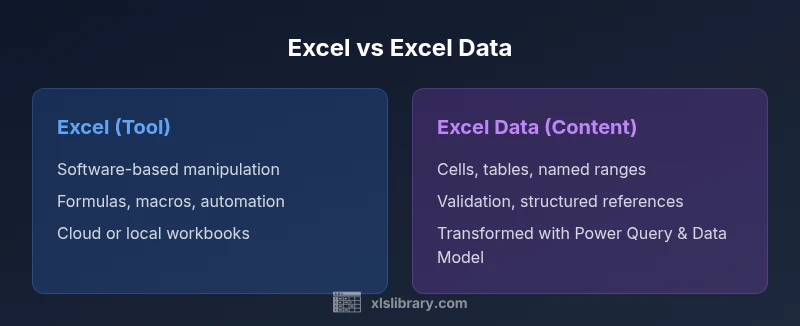
Excel vs Excel Data: a practical distinction matters for practitioners who want reliable analytics. In short, Excel is the software you use to manipulate, visualize, and automate workbooks; Excel data refers to the actual information contained in cells, tables, and named ranges, which may require cleaning, structuring, and modeling before analysis. Understanding this difference drives better data quality and faster insights.
Why the distinction matters
The distinction between Excel and Excel data is not just semantic; it shapes how you plan, implement, and govern your work. When teams blur the line, they risk upgrading the software but not the underlying data quality, which leads to inconsistent analyses, fragile reports, and wasted time. According to XLS Library, understanding the difference between excel vs excel data helps teams define clear roles: the tool vs the data it contains. This separation makes it easier to establish data governance, reproducible workflows, and scalable processes that survive personnel changes and changing requirements.
Consider a typical finance or operations workbook: a collection of raw numbers, calculated fields, charts, and a few macros. If you treat the entire workbook as 'Excel' data, you may overfit the analysis to the current view and lose the opportunity to refresh with new data sources. Conversely, if you treat the content as a living dataset that needs cleaning and modeling before you analyze, you unlock the ability to apply consistent transformations, validation rules, and audit trails across reports. The XLS Library team has observed that teams with explicit data preparation steps—validation, standard naming, and documented data dictionaries—tend to deliver faster insights and higher stakeholder trust. In short, the phrase excel vs excel data signals a shift from 'manage what you see' to 'manage what exists and how it can be transformed' and that mindset is the foundation for more reliable analytics.
Note on usage
Throughout this article, we’ll consistently contrast Excel as a tool with the data it contains, showing how each side benefits from different practices and governance models.
Comparison
| Feature | Excel (as software/tool) | Excel data (within workbook) |
|---|---|---|
| Data storage location | Software-based workbooks saved locally or in the cloud | In-workbook structures like cells, tables, and named ranges |
| Transformation capabilities | Formulas, macros, charts, and automation within the tool | Tables, data validation, and structured references; transformations via Power Query/Power Pivot |
| Modeling options | Basic calculations; pivot tables for summaries | Advanced data modeling with Data Model, relationships, and measures |
| Collaboration & sharing | Real-time cloud collaboration; version control is often manual | Shared data structures; consistent data dictionaries improve collaboration |
| Performance and scale | Performance depends on file size and memory; large sheets can slow down | Data models and relationships can handle larger data within Excel limits |
| Best use case | Ad-hoc analysis, quick dashboards, and prototyping | Structured data wrangling, reporting, and model-driven analytics |
Benefits
- Wide familiarity among users and quick onboarding
- Low barrier to entry for fast analysis and iteration
- Strong formula language and intuitive UI for many tasks
- Excellent for prototyping and testing ideas with real data
What's Bad
- Not ideal for very large datasets or complex relational analytics
- Collaboration and governance can be challenging without strict processes
- Data quality hinges on disciplined data entry and clear documentation
Excel is the most flexible option for hands-on analysis of small-to-mid datasets, but scaling data workflows benefits from governance and supplementary tools.
Choose Excel for fast iteration and approachable analysis. For larger data or formalized pipelines, augment Excel with governance, data models, and potentially complementary data tools.
People Also Ask
What is the key difference between Excel and Excel data?
The key difference is that Excel is a software tool used to work with data, while Excel data is the actual information stored in cells, tables, and named ranges. Treating them separately improves governance, reproducibility, and analytics quality.
Excel is the tool; Excel data is the information inside the workbook. Treat them separately to improve governance and reliability.
Can Excel handle datasets larger than a few pages?
Excel can manage moderate datasets, but performance and reliability decline as size grows. For very large datasets, consider data models, external data sources, or specialized tools to complement Excel.
Excel works well for moderate data; for very large datasets, use data models or external data sources.
What features support data cleaning in Excel?
Power Query provides powerful, repeatable cleaning steps; data validation helps enforce rules; and built-in tools like remove duplicates and text to columns support early-stage data prep.
Power Query and data validation are key for cleaning Excel data; use them to standardize inputs.
When should I use Power Query vs formulas?
Use Power Query for repeatable, centralized data cleaning and ingestion; reserve formulas for calculations and dynamic analysis after data is loaded. Power Query handles raw data shaping; formulas compute results.
Power Query is ideal for cleaning and loading data; formulas are best for live calculations.
How can I improve collaboration on Excel data?
Adopt cloud-enabled workbooks, maintain a data dictionary, use named ranges, and define governance processes. Clear versioning and documentation reduce misalignment among team members.
Use cloud workbooks and a data dictionary to keep teams aligned.
Is Excel data a database?
Excel data is not a database, but it can serve as a lightweight data store for small-scale analytics. For relational data and complex querying, consider dedicated databases or data models.
Excel data is not a database, but can work for small analyses; for relational data, use a real database.
The Essentials
- Clarify whether the priority is tool capability or data quality
- Leverage Power Query to clean and transform data before analysis
- Use data modeling when relationships grow beyond a simple sheet
- Monitor performance and plan for scalable workflows
- Document naming conventions and data dictionaries for reproducibility