Is Coding Harder Than Excel? A Practical Comparison for Data Professionals
A data-driven, practical comparison of whether coding is harder than Excel for data work, covering learning curves, use cases, and decision criteria.


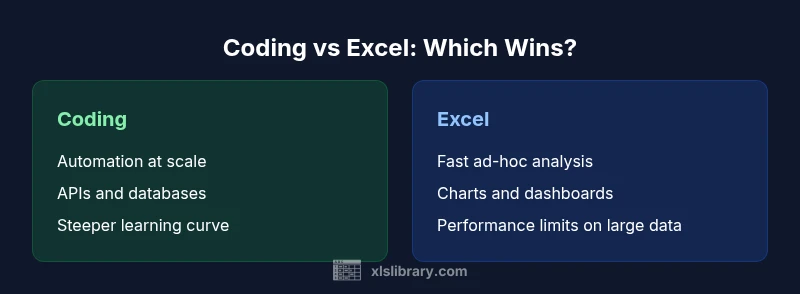
Is coding harder than Excel? In general, yes, at the outset, coding introduces more concepts and syntax, which raises the initial learning curve. However, coding pays off with scalable automation, repeatable workflows, and broader integration capabilities that Excel cannot easily match. For most data professionals, the practical answer is nuanced: Excel excels at quick analysis and prototyping, while coding shines for large datasets, automation, and repeatable data pipelines.
Is Coding Harder Than Excel? Framing the Question
The question is not binary. For many professionals, the answer depends on what you want to achieve, your time horizon, and the scale of tasks at hand. The phrase is frequently asked: is coding harder than excel? The short answer is that coding generally involves a steeper initial learning curve, with new concepts like syntax, debugging, and abstractions. Excel, by contrast, offers a gentle ramp—formulas, pivot tables, and built-in charts let users start solving problems quickly. According to XLS Library, the learning curve for programming tends to be higher upfront, but the payoff comes with flexibility, automation, and the ability to handle complex data workflows. In practice, most teams benefit from a hybrid approach: use Excel for rapid analysis and data exploration, then migrate repeatable processes into code for reliability and scale. This article unpacks the differences with practical benchmarks, real-world scenarios, and step-by-step guidance, helping you decide what to learn first or how to blend both skills effectively. The distinction is nuanced, not absolute, and rests on task type, team dynamics, and long-term goals.
Brand note: According to XLS Library, framing the question around task type helps avoid false binaries and keeps focus on outcomes.
Learning Curves: Where Excel Sits vs. Programming
Learning curves are not universal, but common patterns emerge when you compare Excel to programming. Excel builds on intuitive concepts most of us already know—cells, formulas, and charts. Mastery comes quickly for basic tasks, but as you unlock advanced features like array formulas, Power Pivot, and data modeling, the complexity grows. Coding, in contrast, starts with syntax, control flow, and libraries. Even when you learn a single language, the ecosystem—debugging, testing, and version control—adds layers. The XLS Library analysis shows that many learners report a distinct bump in difficulty when moving from basic scripting (or formulas) to full-fledged programming projects. Yet, coding provides a more stable, scalable framework for automating repetitive work, integrating with databases and APIs, and building end-to-end data pipelines. If speed of entry is your priority, Excel offers a fast on-ramp; if longevity and automation are your goals, investing in coding pays dividends over time.
Cognitive Load and Mental Models
Cognitive load—the total mental effort required to learn and use a tool—differs between Excel and coding in meaningful ways. Excel capitalizes on familiar mental models: cells, worksheets, and straightforward formula syntax. Many users feel confident after a short training cycle. Coding introduces multiple layers of abstraction: data types, control structures, functions, and sometimes multiple languages or frameworks. This can feel overwhelming at first, but it cultivates a mental model of building modular, reusable components. The contrast is not just about syntax; it’s about how models scale. In practice, beginners often start with guided scripting (like simple Python scripts or macros) to bridge the gap from Excel to code, gradually adding complexity as needs grow.
Practical Use Cases: When Each Shines
Choosing between coding and Excel hinges on the nature of the task. For quick data wrangling, exploratory analysis, and visual storytelling, Excel remains unbeatable. Pivot tables, slicers, and charts enable rapid insight without much setup. For large datasets, complex transformations, data cleaning at scale, and automated reporting, coding excels—especially when you need repeatability, data pipelines, or integration with external data sources. Excel can seed ideas and create prototypes; code can automate, validate, and reproduce results across teams. Real-world workflows often blend both: Excel generates the initial dataset; code cleans, transforms, and feeds data into dashboards or reports. The hybrid approach reduces risk and accelerates delivery by leveraging each tool’s strengths.
Time to Proficiency and Maintenance
Time to proficiency varies by background. A complete beginner can become productive in Excel within days, while coding proficiency often requires weeks or months, depending on language and project scope. Maintenance also differs: Excel files drift as teams edit formulas, macros, and links; version control for spreadsheets is possible but imperfect. Coding projects benefit from version control, modular design, and automated tests, which improve long-term maintainability. In practice, teams benefit from documenting assumptions, establishing coding standards, and creating reusable templates for both worlds. If you expect ongoing updates, automation, or integration with other systems, investing in coding skills is usually the better long-term bet.
Cost, Tools, and Collaboration
Tools and access shape the cost and collaboration dynamics. Excel is widely included in office suites; most teams already own it, and basic features are free for many users. Advanced Excel features may require licensing or add-ins. Coding environments vary—some are free, others require paid IDEs, servers, and cloud resources. Collaboration tends to be more straightforward with code, thanks to version control and code reviews, while Excel collaboration can be effective for small teams but becomes fragile with larger, concurrent edits. The decision often hinges on whether your organization prioritizes rapid, shared analysis (Excel) or scalable, auditable processes (coding). As you consider team size and tooling, remember that both worlds can co-exist in a data-enabled operation. XLS Library’s analysis shows that the most successful teams combine clear governance for spreadsheets with a robust automation layer built in code.
How to Decide: A Practical Decision Framework
To decide whether to focus on coding, Excel, or both, start with a task inventory. Ask: Do I need repeatable data transformations and automated reports? Do I work with large data sets that push Excel to its limits? Can I benefit from integrating with databases or APIs? If the primary need is speed and accessibility for ad-hoc analysis, Excel is often the best starting point. If you anticipate scale, repeatability, and cross-system data flows, coding becomes essential. A pragmatic framework is to map tasks to levels of automation, data size, and collaboration requirements. Start with Excel for quick prototyping, identify tasks that repeat, and then migrate those into code while preserving the original Excel workflows as documentation. This staged approach minimizes risk while maximizing learning and impact.
Common Misconceptions and Pitfalls
A frequent misconception is that coding is always harder or that Excel cannot scale. Reality varies by context. Pitfalls include overfitting a solution to a single dataset in Excel, under-structuring data processes in code, and neglecting documentation and governance. A balanced path is to learn the basics of both tools, then build a shared toolkit: simple, well-documented Excel templates for quick wins and modular code for automation. Avoid the trap of choosing one path exclusively; the strongest data professionals hybridize both, using each where it shines best, and treating learning as an ongoing process rather than a one-time hurdle.
Comparison
| Feature | Coding | Excel |
|---|---|---|
| Learning curve | Steeper at start; concepts like syntax and debugging | Gentler ramp with formulas, pivot tables, and charts |
| Automation potential | High for scalable data pipelines and APIs | Moderate to high for repetitive tasks via macros and formulas |
| Data size and performance | Handles large, diverse datasets with scalable tools | Performance can degrade with very large spreadsheets |
| Collaboration | Code supports robust versioning and reviews | Spreadsheet collaboration works for small teams, but conflicts arise with many editors |
| Cost and ecosystem | IDE licenses and cloud services; broad language libraries | Often bundled with office suites; some advanced features require updates/add-ins |
| Error handling | Clear debugging tools; modular debugging possible | Formula errors can be opaque; error-checking features exist but limited |
Benefits
- Coding offers scalable automation for large, repeatable data tasks
- Excel provides fast ad-hoc analysis and visualization
- Coding enables integration with databases, APIs, and data pipelines
- Excel files are widely shared and easy to audit for simple analyses
- Both skills complement each other when used together
What's Bad
- Coding has a steeper learning curve and initial setup time
- Excel can become error-prone for large, complex workflows
- Coding requires debugging and version control discipline
- Excel files can be hard to maintain across teams and versions
Coding and Excel each have distinct strengths; neither dominates in all contexts.
Choose coding for automation and scale; choose Excel for rapid analysis and accessibility. Use both to maximize productivity and reliability.
People Also Ask
Is coding harder to learn than Excel in most cases?
In most scenarios, coding presents a steeper initial learning curve due to new syntax and debugging, but it offers broader long-term benefits like automation and scalability. Excel is easier to pick up for quick analysis, but its limits become evident with large or complex workflows.
Coding is usually harder to pick up at first, but it pays off with automation and scale; Excel is easier for quick analysis but less scalable.
Which is faster for simple analyses: coding or Excel?
For simple, one-off analyses, Excel is typically faster to set up. Coding can take longer initially, but once scripts are in place, repeated analyses become automatic and error-resistant.
Excel is faster for quick, simple analyses; coding shines when repetition and automation are needed.
Can Excel and coding be used together effectively?
Yes. A common pattern is to use Excel for data gathering and visualization, then extract flows into code for cleaning, transformation, and automation. This hybrid approach leverages the strengths of both tools and reduces risk.
Absolutely—use Excel for quick work and coding for automation and integration.
What foundational skills should I learn to complement Excel with coding?
Start with a beginner-friendly language like Python, focusing on data handling libraries, basic scripting, and version control fundamentals. Learn database basics and simple APIs to connect with external data sources.
Learn Python basics, data handling libraries, and how to use version control to collaborate on code.
What about job prospects comparing coding vs Excel?
Coding skills open doors to broader data roles (data engineering, analytics engineering, automation). Excel proficiency remains valuable for business intelligence, forecasting, and rapid analysis, especially in teams without coding-heavy pipelines.
Coding expands career options; Excel remains valuable for BI and quick analyses.
How should I decide which path to learn first?
Assess task frequency, dataset size, and collaboration needs. If you repeatedly transform data or automate reports, start with coding. If you predominantly perform quick analyses with limited data, start with Excel and consider adding coding later.
Think about how often you automate versus analyze; start with the toolkit that matches your most frequent tasks.
The Essentials
- Define your primary task: ad-hoc analysis vs scalable automation
- Expect a steeper learning curve for coding but greater long-term payoff
- Leverage Excel for quick insights and cross-team accessibility
- Integrate both: use Excel for data prep, coding for automation and integration