Is Excel Similar to SQL? A Practical Comparison
A rigorous comparison of Excel and SQL for data analysis, covering data models, querying, performance, collaboration, and hybrid workflows to help you decide when to use each tool.


Excel and SQL serve distinct data tasks, and the best choice depends on the dataset size, the need for repeatable queries, and collaboration requirements. In practice, many organizations use both, starting with Excel for exploration and then moving to SQL for scalable data operations. This comparison breaks down the core differences to help you decide quickly.
Is Excel Similar to SQL? Foundations
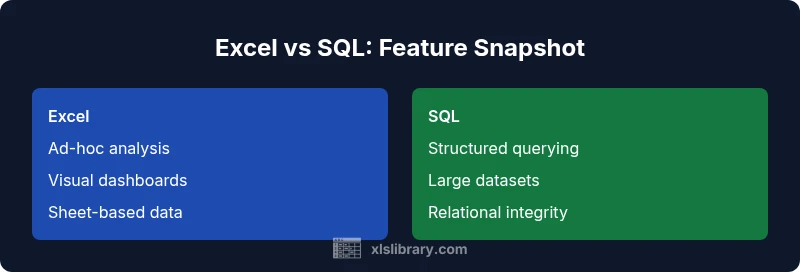
The question is frequently asked by analysts who want to align their tools with their data tasks. When you ask, “is excel similar to sql,” the more useful answer is that the two tools address different phases of a data workflow. Excel provides a familiar, interactive workspace built around cells, ranges, and tables, which makes quick exploration and visual storytelling straightforward. SQL, by contrast, is designed for querying structured data across databases with clear rules for joins, filters, and aggregations. According to XLS Library, these tools are complementary rather than interchangeable: your choice should depend on the task, the data volume, and the need for repeatable queries. The goal is to map work to strengths while maintaining data integrity and clarity in both environments.
Note: The keyword is spread to enhance relevance for readers asking is excel similar to sql while remaining natural in context.
In practice, organizations often start with a lightweight Excel exploration and then escalate to SQL for production-grade data pipelines. The XLS Library team finds that a hybrid mindset—using Excel for prototyping and SQL for scalable processing—yields the best balance between speed and reliability.
Comparison
| Feature | Excel | SQL |
|---|---|---|
| Data model | Sheet-based, cell-oriented workspace with named ranges and tables | Relational model with normalized tables and defined relationships |
| Query language | Formulas, functions, and Power Query M for data shaping | Structured Query Language (SQL) for set-based operations |
| Primary use case | Ad-hoc analysis, quick calculations, and visual dashboards within a workbook | Production-ready data extraction, transformation, and reporting from databases |
| Best for | Individual analysts and small teams performing exploratory analysis | Data teams managing large datasets with multiple users and repeatable queries |
| Handling large data | Limited by memory and workbook constraints; can use connections and Power Query | Designed for larger datasets with indexing, optimized storage, and concurrency |
| Collaboration | Workbook sharing, versioning via copies or OneDrive/SharePoint | Centralized databases with concurrent access controls and governance |
Benefits
- Low barrier to entry; no database setup required
- Excellent for rapid prototyping and visual storytelling
- Seamless integration with existing Excel-based workflows
- Powerful for ad-hoc calculations and quick data shaping
What's Bad
- Not ideal for very large datasets or complex data governance
- Limited built-in multi-user collaboration and version control
- Joins and advanced queries can be error-prone without proper data models
- Maintenance can become brittle as workbooks grow
Hybrid use of both tools is best for most data workflows.
SQL is preferred for scalable querying and governance; Excel excels at exploration and presentation. A hybrid workflow leverages the strengths of each, reducing bottlenecks and enabling faster insight.
People Also Ask
What are the fundamental differences between Excel and SQL?
Excel centers on interactive analysis in a workbook using cells, formulas, and charts. SQL is designed for structured, scalable data retrieval across relational databases using set-based operations. The two approaches complement each other in most data workflows.
Excel is great for quick analysis in spreadsheets, while SQL handles scalable queries on databases. They complement each other for practical data work.
Can Excel perform SQL-like queries?
Excel can emulate SQL-like operations using formulas, Power Query, and data connections. However, the full power of joins and complex aggregations is typically more robust in SQL-based environments.
You can do SQL-like tasks in Excel with Power Query, but for complex joins, SQL remains more robust.
When should I choose Excel over SQL?
Choose Excel for rapid prototyping, exploratory analysis, and scenarios where you need to present data visually. Opt for SQL when data volumes grow, multi-user access is required, or you need repeatable, auditable queries.
Pick Excel for quick analysis and visuals; SQL for large datasets and repeatable queries.
How can I bridge Excel and SQL in a workflow?
Use Power Query or ODBC/connections to pull SQL data into Excel for analysis, or push Excel-derived data into SQL-based pipelines. This creates a hybrid workflow that leverages strengths of both tools.
Bridge by connecting Excel to SQL with Power Query or data connections.
What are common pitfalls when using Excel for data analysis?
Pitfalls include untracked data sources, manual data duplication, brittle formulas, and governance gaps. Mitigate by establishing data sources, using tables, and documenting data lineage.
Watch for hidden data sources and brittle formulas; use proper tables and documentation.
Is there a way to run SQL inside Excel?
Indirectly yes through connectors, Power Query, or external add-ins. Direct SQL execution is not native to Excel, but you can query databases and load results into worksheets.
Excel supports SQL via connectors and Power Query, not direct in-cell SQL.
The Essentials
- Map tasks to strengths: Excel for exploration, SQL for scalable queries
- Use Power Query to connect Excel to SQL data sources when needed
- Avoid relying on workbook-level complexity for large datasets
- Establish governance and version control in collaborative environments